Is There a Google Ads Support Email for Agencies?
No universal Google Ads support email exists. Learn official agency support routes, escalation tips and what to include for faster answers.
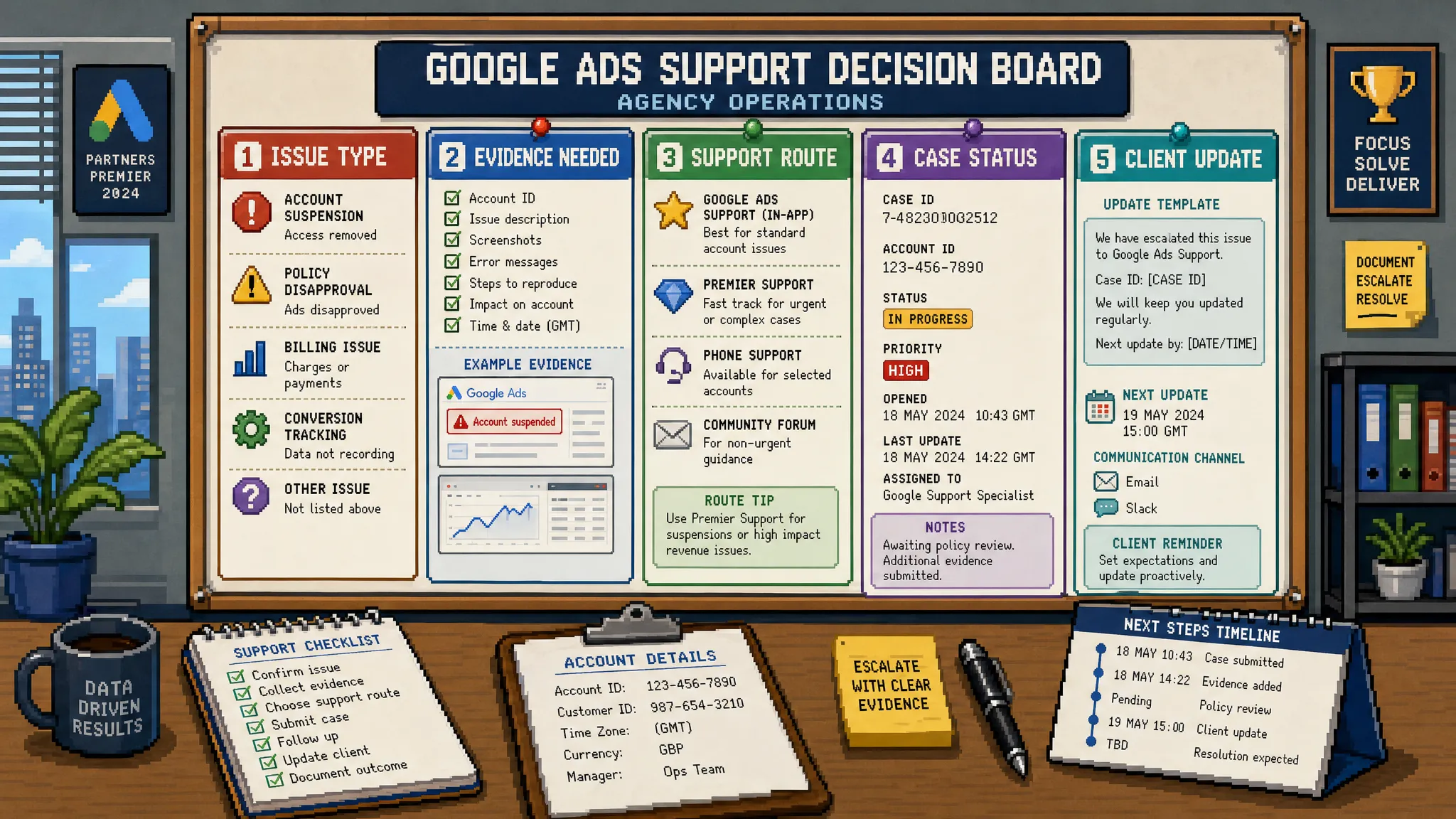
Short answer: there is no single public Google Ads support email for agencies that works for every account or issue.
In most cases, agencies need to start with Google’s official support flow inside Google Ads or via the Google Ads Help Centre. If your issue qualifies for email support, Google may open a case and continue the conversation by email. But that is not the same as having one universal inbox you can message whenever a client account catches fire.
For agencies, that distinction matters. A delayed suspension review, billing problem, conversion tracking issue or rejected ad can quickly become a client communication problem. The fastest route is rarely “find an email address”. It is knowing which support channel to use, what evidence to provide, and what you can fix yourself before waiting on Google.
Why agencies keep looking for a Google Ads support email
Most agency searches for a Google Ads support email happen under pressure. A client has noticed leads have dropped. A card payment failed and campaigns stopped. A policy disapproval is blocking a launch. A Performance Max campaign is spending in the wrong direction. Or an account has been suspended with limited detail.
In those moments, a direct email feels like it should be the simplest answer. Agencies want a paper trail, a named contact and a way to escalate the issue without sitting in a help menu.
The problem is that Google Ads support is account-led. The options you see can vary based on factors such as your location, account access, account type, spend level, issue category, Google Partner status and whether you have an assigned Google contact. That is why one agency may see chat, phone and email options, while another may only see help articles or a contact form.
So the better question is not only “What is the Google Ads support email?” It is: What is the most reliable support route for this specific account and issue?
The official ways agencies can contact Google Ads support
Google’s recommended starting point is the Google Ads Help contact flow, where you sign in, describe the issue and see available support options. Agencies can also use the help icon inside the Google Ads interface when logged into the relevant account or manager account.
Here is how the main routes compare.
| Support route | Best for | Agency notes |
|---|---|---|
| Google Ads Help contact flow | Account-specific issues, technical problems, billing, policy queries | Sign in with an account that has access to the affected Google Ads account. |
| In-account help icon | Faster context for live accounts | Useful when you already have the client CID open and can describe the issue clearly. |
| Email case from Google | Ongoing support after a case is created | Usually starts through the support flow, not by emailing a public address first. |
| Google Ads Help Community | General troubleshooting and non-confidential questions | Do not post client data, payment details or private account information. |
| Google Partners resources | Eligible agency support, training and account guidance | Support options vary and Partner status does not guarantee a dedicated inbox. |
| Assigned Google representative | Strategic recommendations, account reviews and some escalations | Helpful when available, but still not a substitute for strong PPC QA and tracking checks. |
If you are managing clients through a manager account, make sure you are logged into the correct Google profile and have the right permissions. Support cannot always help if you cannot prove access to the affected account.
Does Google ever reply by email?
Yes, Google can reply by email once a support case is created. This is often where confusion comes from.
An agency may contact Google through the help flow, choose email as the available option, receive a case ID, then continue the thread via email. From the agency’s point of view, that feels like a Google Ads support email. But the important part is that the case was created through an authenticated route first.
That case-specific thread is usually the safest way to continue the conversation because it preserves the reference number, account context and support history. If you start a new message to an old support address, it may not route correctly, may be ignored, or may not connect to the live issue.
Treat any unofficial “Google Ads support email” you find online with caution. Google Ads accounts contain billing data, conversion data and business-sensitive information. A fake support inbox can become a phishing risk, especially when clients are already anxious and likely to click quickly.
What agencies should do before contacting support
Before you contact Google, do a quick triage. This saves time and helps you avoid raising a vague ticket that gets a generic response.
First, confirm the issue is actually something Google needs to resolve. Many problems that look like “Google is broken” are really account configuration issues. Examples include broken conversion tags, incorrect conversion goals, over-broad match types, limited budgets, poor location settings, audience signal misunderstandings or landing page changes.
If the issue is related to wasted spend or account efficiency, it may be faster to audit the account yourself before contacting support. For example, reviewing search terms, campaign settings and conversion actions can often uncover the root cause without waiting for a reply. PPC Ghost has a practical guide on PPC Google Ads tips that cut wasted spend fast if you need a structured triage process.
For urgent issues, gather the essentials before opening the case:
- Client Google Ads customer ID and manager account ID if relevant
- Clear summary of the issue in one or two sentences
- Date and time the issue started, including time zone
- Screenshots of errors, disapprovals or warnings
- Campaign, ad group, ad, asset, keyword or conversion action names
- Recent changes made by the agency, client, website team or Google recommendations
- Business impact, such as campaigns paused, lead volume down or launch blocked
A support agent should not have to reverse-engineer the situation from a frustrated paragraph. The clearer your first message, the better your chance of getting a useful answer.
What to include for common Google Ads support issues
Different issues need different evidence. A billing ticket with no payment profile details will stall. A policy appeal with no ad IDs or landing page context will likely get a generic policy response. A tracking issue without tag details is hard to diagnose.
Use this table as a quick agency checklist.
| Issue type | Include in your support request | What to avoid |
|---|---|---|
| Account suspension | Suspension message, account CID, business model, landing page URL, recent account changes | Emotional language, duplicate appeals with different explanations |
| Ad disapproval | Policy name, ad or asset ID, landing page URL, screenshots, why you believe it complies | Repeated resubmissions without fixing the underlying issue |
| Billing problem | Account CID, payment profile context, invoice or payment date, exact error message | Sharing full card details outside secure Google forms |
| Conversion tracking issue | Conversion action name, tag setup method, GA4 or GTM context, test results, date tracking changed | Saying “tracking is broken” without showing what changed |
| Access problem | Manager account ID, user email involved, permission level required, screenshot of access error | Asking support to bypass normal client approval processes |
| Campaign serving issue | Campaign name, status, budget, bid strategy, policy status, diagnostics and recent edits | Assuming low impressions always means a platform fault |
This is also where agency process matters. Keep a shared log of support cases, responses, screenshots and final outcomes. That prevents the same issue from being raised three different ways by three different people.
For larger teams, it can also help to centralise support scripts, escalation notes and policy checklists in a controlled internal system. Some agencies use ticketing tools, wikis or a self-hosted shared AI agent for teams so account managers and specialists can follow consistent workflows without scattering sensitive client context across personal tools.
A simple support request template agencies can use
You can adapt this template when opening a case through Google’s support flow.
Issue summary: [Briefly describe the problem and business impact]

Google Ads customer ID: [CID]
Manager account ID: [If relevant]
Client website: [URL]
Issue category: [Billing, policy, tracking, access, serving, other]
When it started: [Date, time and time zone]
Affected items: [Campaigns, ads, assets, keywords, conversion actions or payment profile]
Recent changes: [Changes made in Google Ads, GTM, GA4, website, feed, billing or landing pages]
Evidence attached: [Screenshots, error messages, diagnostics, policy notices]
What we have already checked: [Brief list of checks completed]
Requested outcome: [What you need Google to confirm, review or resolve]
The “what we have already checked” line is important. It signals that a specialist has done the basics and helps avoid a first reply that simply points you back to a help article.
What if you are a Google Partner agency?
Being a Google Partner can help, but it does not mean there is one guaranteed agency-only email address for every situation.
Google Partners may get access to additional training, insights, promotional resources and support options depending on eligibility and region. You can review the official Google Partners programme for current details. However, support availability can still vary by account and issue type.
In practice, Partner status is most useful when combined with good internal escalation habits. Keep your account access clean. Maintain proper MCC structure. Document support cases. Keep policy and billing screenshots. Make sure client communication is calm and specific.
Clients rarely care whether the delay is caused by Google, the agency, the website team or the payment provider. They care whether you are in control of the situation.
When not to wait for Google Ads support
There are situations where only Google can help. Account suspensions, billing holds, certain verification issues, unexplained access restrictions and some policy reviews may require official support.
But agencies often lose time waiting for Google on problems that can be diagnosed internally. For example, if lead quality has dropped, support is unlikely to solve that for you. You need to review queries, conversion actions, bidding signals, landing page intent and CRM feedback. If spend has shifted inside Performance Max, you need to inspect asset groups, listing groups, audience signals, search term insights and conversion goals.
The same applies to many tracking issues. Google support may point you towards documentation, but a senior PPC specialist or tracking specialist can often identify the real problem faster by checking GA4 events, Google Tag Manager triggers, consent mode behaviour and conversion import settings.
This is where agencies need to separate platform dependency from delivery capability. Google support is there for platform and account issues. It is not a replacement for PPC strategy, QA, tracking governance or client-ready communication.
How to communicate delays to clients
If you are waiting on a Google support case, do not go silent. Silence makes the agency look passive, even if the delay is outside your control.
A good client update should include what happened, what you have checked, what has been escalated, the expected next step and what you are doing to reduce risk in the meantime.
For example:
We have identified that the account issue is linked to [specific issue]. We have checked [items checked] and opened a case with Google under reference [case ID]. While we wait for their response, we have taken [risk control action] so spend and reporting remain protected. We will update you again by [time/date], or sooner if Google responds before then.
That type of message shows control. It also avoids overpromising a resolution time that depends on Google.
Building an agency support SOP
If your agency manages multiple Google Ads accounts, you should not treat support requests as one-off admin tasks. Build a simple SOP so every account manager and PPC specialist knows what to do.
A strong SOP should define who opens support cases, who approves policy appeals, where case IDs are logged, what screenshots are required, how clients are updated and when an issue should be escalated internally.
The biggest advantage is consistency. When a client account has a problem, the team should not be asking, “Who has the support email?” They should already know the official route, the evidence needed and the backup plan.
This becomes even more important for agencies using freelance, white-label or overflow PPC support. External specialists can move much faster when access, naming conventions, tracking notes and escalation history are already organised.
Frequently Asked Questions
Is there a direct Google Ads support email for agencies? Not usually. Google does not provide one universal public support email for all agencies and accounts. Most support requests should start through the Google Ads Help contact flow or the help option inside the account.
Can I email Google Ads support if I already have a case ID? Often, yes. If Google has opened a case and replied by email, you can usually continue on that case-specific thread. Keep the case ID in the subject line and avoid starting separate duplicate threads.
Why do some agencies see email support and others do not? Support options can vary based on account access, location, account status, issue type, spend level and eligibility. Google may offer chat, phone, email or self-service resources depending on the situation.
Does Google Partner status give agencies a special support email? Google Partner status may provide additional support options and resources, but it does not guarantee a single direct email address for every account issue.
What is the fastest way to get useful Google Ads support? Sign in with the correct account access, use the official support flow, provide the client CID, explain the issue clearly, attach evidence and state what you have already checked.
Should agencies share client passwords with Google support? No. Agencies should use proper account access, manager account permissions and secure support forms. Never share passwords or full payment card details in ordinary email threads.
Need senior Google Ads support without the recruitment headache?
Sometimes the blocker is not a missing Google Ads support email. It is a lack of senior PPC capacity when client accounts need fast, accurate diagnosis.
PPC Ghost provides white-label Google Ads, Meta Ads and Microsoft Ads support for agencies that need expert execution on demand. You get senior-only PPC help, same-day turnaround where possible, GA4 and tracking support, and flexible pay-as-you-go delivery while your agency stays front and centre.
If your team is stuck waiting, firefighting or stretched across too many accounts, PPC Ghost can help you protect client confidence and keep delivery moving.