Google Ads Tracking Errors That Skew Performance Data
Fix Google Ads tracking errors that skew performance data, from duplicate tags to GA4 imports, consent issues and poor lead quality signals.
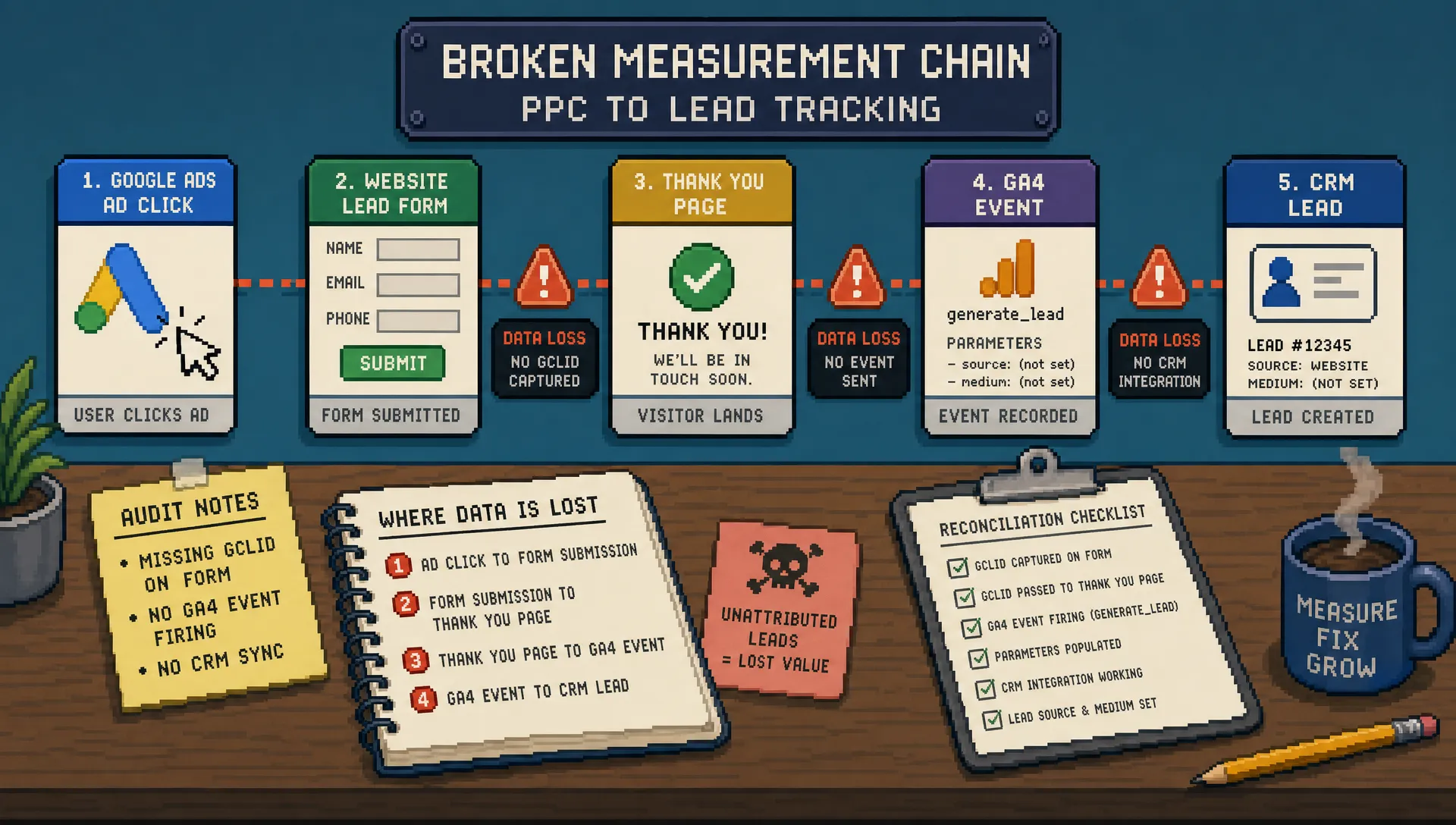
Bad Google Ads tracking does not just make reports untidy. It changes the decisions your agency makes, from which campaigns get budget to whether a client believes PPC is working at all.
For agencies, this is especially risky because tracking errors often look like performance problems. A campaign may appear to have a poor CPA, a landing page may look weak, or Performance Max may seem to be generating leads, when the real issue is that the data feeding those conclusions is incomplete, duplicated, delayed or polluted.
Google Ads tracking is not a one-time setup task. It needs regular auditing, especially after site changes, CRM changes, consent banner updates, new landing pages, GA4 changes or account restructures. Below are the most common tracking errors that skew performance data, plus how to spot them before they damage optimisation and client trust.
Why tracking errors distort PPC decisions
Google Ads increasingly relies on conversion signals to optimise bids, audience learning and campaign delivery. If the account is measuring the wrong actions, missing high-value actions or counting the same lead twice, the platform is learning from flawed inputs.
That affects more than reporting. It can influence Smart Bidding, budget allocation, search term decisions, creative testing, landing page evaluation and client conversations.
This is why tracking should be audited before judging campaign performance. If you are also reviewing broader account inefficiencies, PPC Ghost’s guide to PPC Google Ads tips that cut wasted spend fast covers practical areas beyond tracking, including search terms, locations and budget leakage.
1. Counting every form interaction as a conversion
One of the most common Google Ads tracking mistakes is treating low-intent actions as primary conversions. Examples include button clicks, form starts, page views, phone number clicks or visits to a thank-you page that can be reached without submitting a form.
These actions can be useful as secondary signals, but they should not usually drive bidding unless they genuinely represent business value. A “contact button click” is not the same as a qualified enquiry. A “pricing page view” is not the same as a sales opportunity.
This error usually shows up as inflated conversion volume, unusually low CPA and poor lead quality in the client’s CRM. The campaign looks efficient inside Google Ads, but the client says the leads are weak or non-existent.
A cleaner approach is to define conversion hierarchy:
| Conversion action | Typical role | Should it guide bidding? |
|---|---|---|
| Qualified lead submission | Primary conversion | Usually yes |
| Phone call over a meaningful duration | Primary or secondary | Depends on call quality |
| Form start | Secondary signal | Usually no |
| Button click | Secondary signal | Usually no |
| Page view or key page visit | Observation only | Usually no |
The goal is not to track less. It is to separate diagnostic events from commercial outcomes.
2. Duplicate conversion tags firing on the same action
Duplicate tracking is easy to miss because the account appears to be generating more results. In reality, the same conversion may be recorded twice or even three times.
This often happens when multiple tracking routes are active at once. For example, a lead may be tracked through a Google Ads conversion tag, a GA4-imported key event and a hardcoded thank-you page script. If all are marked as primary, Google Ads may report multiple conversions for one enquiry.
You can spot this by comparing conversion volume against backend leads. If Google Ads shows 80 form submissions but the CRM only has 40 valid enquiries, duplication is a likely suspect. It is also worth checking the “All conv.” column, the “Conversions” column and the status of each conversion action.
The fix is to decide which source is authoritative. For many lead generation accounts, a direct Google Ads conversion tag or a server-side/CRM-based import may be more appropriate for bidding than a broad GA4 event. GA4 still has value for behavioural analysis, but not every GA4 key event should become a primary Google Ads conversion.
Google’s own guidance on setting up conversion tracking is a useful reference when checking whether actions are being counted in the intended way.
3. Using the wrong counting setting
The “Count” setting in Google Ads is small but important. For lead generation, “One” is often the correct setting because the business usually wants to count one lead per user interaction. For ecommerce purchases, “Every” is often more appropriate because multiple purchases can each have value.
Problems arise when this setting does not match the business model. If a lead form conversion is set to “Every”, repeated thank-you page reloads or multiple submissions by the same user can exaggerate results. If ecommerce purchases are set to “One”, revenue and order volume can be understated.
This is one of the fastest checks in a tracking audit, but it is regularly overlooked. Review each conversion action individually rather than assuming the account default is correct.
4. Tracking thank-you pages that are accessible directly
Thank-you page tracking is simple, but it is fragile. If the thank-you URL can be indexed, bookmarked, refreshed, revisited from an email or reached without a successful submission, conversion numbers can become unreliable.
This issue is common after website rebuilds or landing page launches. A developer may create a thank-you page and fire the conversion tag on page load, but forget to block direct access or ensure the page only appears after a valid submission.
Warning signs include conversions from odd referral paths, sudden spikes in conversions without corresponding CRM records, or repeat conversions from the same users.
Where possible, track the actual successful form submission event rather than a simple page load. If using a thank-you page, check that the journey is controlled and that the conversion tag fires only after the form has genuinely submitted.
5. Missing cross-domain tracking
Many businesses send users across multiple domains during the conversion journey. Common examples include booking tools, payment gateways, third-party form platforms, client portals and subdomains.
Without proper cross-domain tracking, sessions can break. GA4 may attribute the conversion to a referral source rather than the original ad click, and Google Ads may fail to connect the conversion back to the right campaign or keyword.
This can make paid search look weaker than it is. It can also cause agencies to pause campaigns that are actually assisting conversions, simply because the tracking chain breaks before the final action.
Cross-domain issues are especially important for sectors such as professional services, clinics, SaaS, education, home services and travel, where booking engines or third-party tools are common.
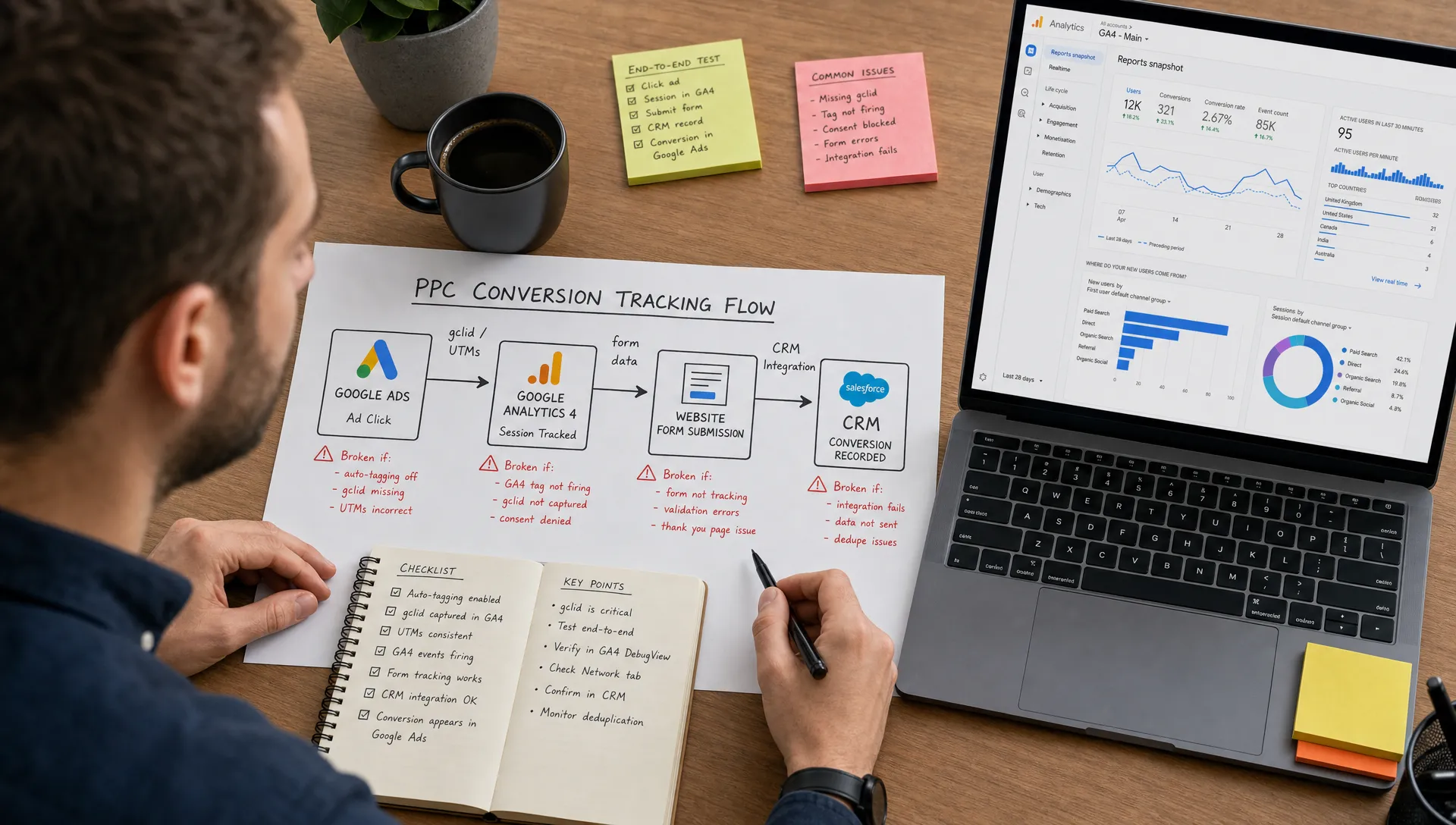
6. Importing GA4 events without checking attribution differences
GA4 and Google Ads do not always report the same conversion numbers, even when tracking is technically working. They use different reporting logic, attribution settings, processing times and scopes.
This becomes a problem when agencies treat GA4-imported events as a perfect replacement for Google Ads conversion tracking without understanding the differences. A conversion that appears in GA4 may not match what Google Ads reports for campaign optimisation.
In 2024, Google renamed GA4 “conversions” as “key events” in many analytics contexts, while Google Ads still uses conversions for advertising measurement. The language shift matters because it reinforces a practical point: GA4 events are not automatically the same as Google Ads bidding goals.
Use GA4 to understand journeys, engagement and channel context. Use Google Ads conversion actions deliberately, with clear primary and secondary settings, to guide paid media optimisation.
7. Not testing consent mode and cookie banner behaviour
Consent banners can quietly break tracking. A tag may fire correctly in preview mode, but behave differently depending on the user’s consent choice, browser, region or device.
For UK and European advertisers, consent implementation is particularly important because analytics and advertising tags often depend on user permissions. Google’s Consent Mode can help model and adjust measurement where consent is not granted, but it still needs correct implementation. A badly configured banner can block tags entirely, fire them too early, or send inconsistent consent states.
When auditing, test the full journey under different consent choices:
- Accept all cookies and complete a conversion.
- Reject non-essential cookies and complete a conversion.
- Change preferences mid-session and test again.
- Test on mobile, desktop and different browsers.
- Check whether Google Tag Manager, GA4 and Google Ads receive the expected signals.
This is not just a legal or technical detail. It directly affects reported conversion volume and the reliability of optimisation data.
8. Ignoring enhanced conversions
Enhanced conversions help improve measurement by sending hashed first-party customer data, such as an email address or phone number, to Google in a privacy-conscious way when a conversion occurs. Google uses this to improve conversion matching where cookies or identifiers are limited.
This does not mean every account will see dramatic reporting changes, and it is not a substitute for a clean tracking setup. However, for many lead generation and ecommerce accounts, enhanced conversions can improve the quality of conversion measurement.
Google provides guidance on enhanced conversions, including how they work and the implementation options available. Agencies should review whether enhanced conversions are appropriate for the client, whether consent requirements are being met and whether the implementation is technically sound.
A common mistake is assuming enhanced conversions are active because a developer “added something” during setup. Always verify the status inside Google Ads and test the conversion journey.
9. Forgetting offline conversion imports
For lead generation, the most valuable performance data often appears after the initial enquiry. A form submission might become a qualified lead, a sales appointment, a proposal, a closed deal or a rejected enquiry.
If Google Ads only tracks the first form submission, it optimises towards volume rather than quality. That is why offline conversion imports can be powerful. They allow advertisers to send later-stage CRM outcomes back into Google Ads, helping the account understand which clicks produced real commercial value.
The tracking error here is not always technical. It is often strategic. Agencies report on leads because leads are easy to track, even though the client cares about qualified opportunities or revenue.
Offline imports require clean data handling, consistent click ID capture and coordination with the client’s CRM or lead management process. They are not always quick to implement, but they can transform how performance is judged.
10. Tracking calls without quality controls
Call tracking can be valuable, especially for service businesses, but it can also skew data if configured poorly. Counting every call as a conversion can reward low-value actions, wrong numbers, existing customer support calls or calls that lasted only a few seconds.
A better setup usually applies minimum call duration thresholds and separates different call sources. Calls from ads, calls from the website and calls from location assets may need different treatment.
For clients with sales teams, it is also worth reviewing call quality. If call conversions are driving bidding, but many calls are irrelevant, Smart Bidding may optimise towards the wrong audience.
Call tracking should answer a commercial question, not just a reporting question. Did the call indicate genuine buying intent?
11. Leaving old conversion actions active
Old conversion actions are a major source of messy reporting. They often remain in accounts after website migrations, campaign restructures, landing page tests or agency handovers.
Typical examples include historic goals from Universal Analytics, old thank-you pages, retired landing page events, duplicate phone call actions and test conversions created during troubleshooting.
Even if these actions are not firing, they create confusion during reporting and audits. If they are firing and marked as primary, they can actively distort bidding.
A good housekeeping process should include:
- Renaming conversion actions clearly.
- Removing or archiving actions that are no longer relevant.
- Marking diagnostic actions as secondary where appropriate.
- Checking recent activity before deleting anything.
- Documenting the purpose of each conversion action.
This is particularly important when an agency inherits an account. If the first report is built on legacy tracking clutter, trust can erode quickly.
12. Failing to reconcile Google Ads with CRM data
No PPC report should exist in isolation. Google Ads might show conversions, GA4 might show key events and the CRM might show leads, but these systems rarely match perfectly. Some variance is normal. Large or unexplained gaps are not.
A monthly reconciliation process can reveal tracking problems before they become client problems. Compare Google Ads conversions against CRM submissions, qualified leads, sales opportunities and revenue where available.
The aim is not to force every platform to match exactly. The aim is to understand the differences well enough to explain them and make better decisions.
| Data source | What it is best for | Common limitation |
|---|---|---|
| Google Ads | Campaign optimisation and paid click performance | Depends on conversion setup quality |
| GA4 | Journey analysis and broader channel context | Attribution and event logic can differ from Google Ads |
| CRM | Lead quality, pipeline and revenue | May depend on manual sales team updates |
| Call tracking platform | Phone lead analysis | Needs quality filters and source consistency |
If the client says “your report shows leads, but we cannot see them,” that is not a small reporting issue. It is a retention risk. PPC Ghost has covered this wider agency challenge in its article on how a Google Ads PPC agency supports client retention.
A simple Google Ads tracking audit workflow
You do not need to rebuild tracking from scratch every time. A structured audit can identify most issues quickly.
Start by listing every conversion action in Google Ads. For each one, record what it measures, where it fires, whether it is primary or secondary, its count setting and whether it still matters commercially.
Then test the main user journeys. Submit forms, make test calls where appropriate, move through checkout or booking flows, and check whether the expected tags fire only once. Use Google Tag Manager preview mode, GA4 DebugView and Google Ads diagnostics where available.
Finally, compare platform data with reality. Pull a sample period and compare Google Ads conversions with CRM leads, ecommerce orders, call records or booking data. Investigate gaps by conversion type rather than looking only at the account total.
For agencies, it is worth building this into onboarding and recurring account maintenance. Tracking should be checked before major budget increases, before switching bidding strategies and before presenting performance conclusions to a client.
Frequently Asked Questions
Why do Google Ads and GA4 show different conversions? Google Ads and GA4 use different attribution, reporting logic, processing times and conversion definitions. Some difference is normal, but large gaps should be investigated, especially if imported events are being used for bidding.
Should every conversion action be marked as primary in Google Ads? No. Primary conversions should reflect the actions you want Google Ads to optimise towards. Lower-intent actions such as button clicks, form starts or page visits are often better used as secondary conversions or diagnostic events.
How often should Google Ads tracking be audited? Agencies should audit tracking during account onboarding, after website or consent banner changes, after CRM changes and before major strategy decisions. A lighter monthly check is also useful for active accounts.
Can bad tracking make campaigns look worse than they are? Yes. Missing conversions, broken cross-domain tracking or poor attribution can understate performance. The opposite is also true: duplicate tags and low-quality conversion actions can make campaigns look better than they are.
Is enhanced conversions enough to fix tracking problems? No. Enhanced conversions can improve matching, but they do not fix poor conversion definitions, duplicate tags, wrong count settings or broken user journeys. It should support a clean setup, not replace one.
Need reliable PPC tracking without hiring in-house?
Tracking errors are rarely glamorous, but they shape almost every PPC decision your agency makes. If the data is wrong, optimisation becomes guesswork and client reporting becomes harder to defend.
PPC Ghost provides senior, white-label Google Ads, Meta Ads, Microsoft Ads and tracking support for UK agencies that need expert execution without recruitment or long-term contracts. If a client account needs a tracking audit, GA4 support or cleaner conversion measurement, you can bring in specialist help while your agency keeps the relationship and the credit.