How to Use the Google Ads Platform More Efficiently
Use the Google Ads platform more efficiently with workflows, filters, automation and tracking habits that help agencies save time and improve PPC control.
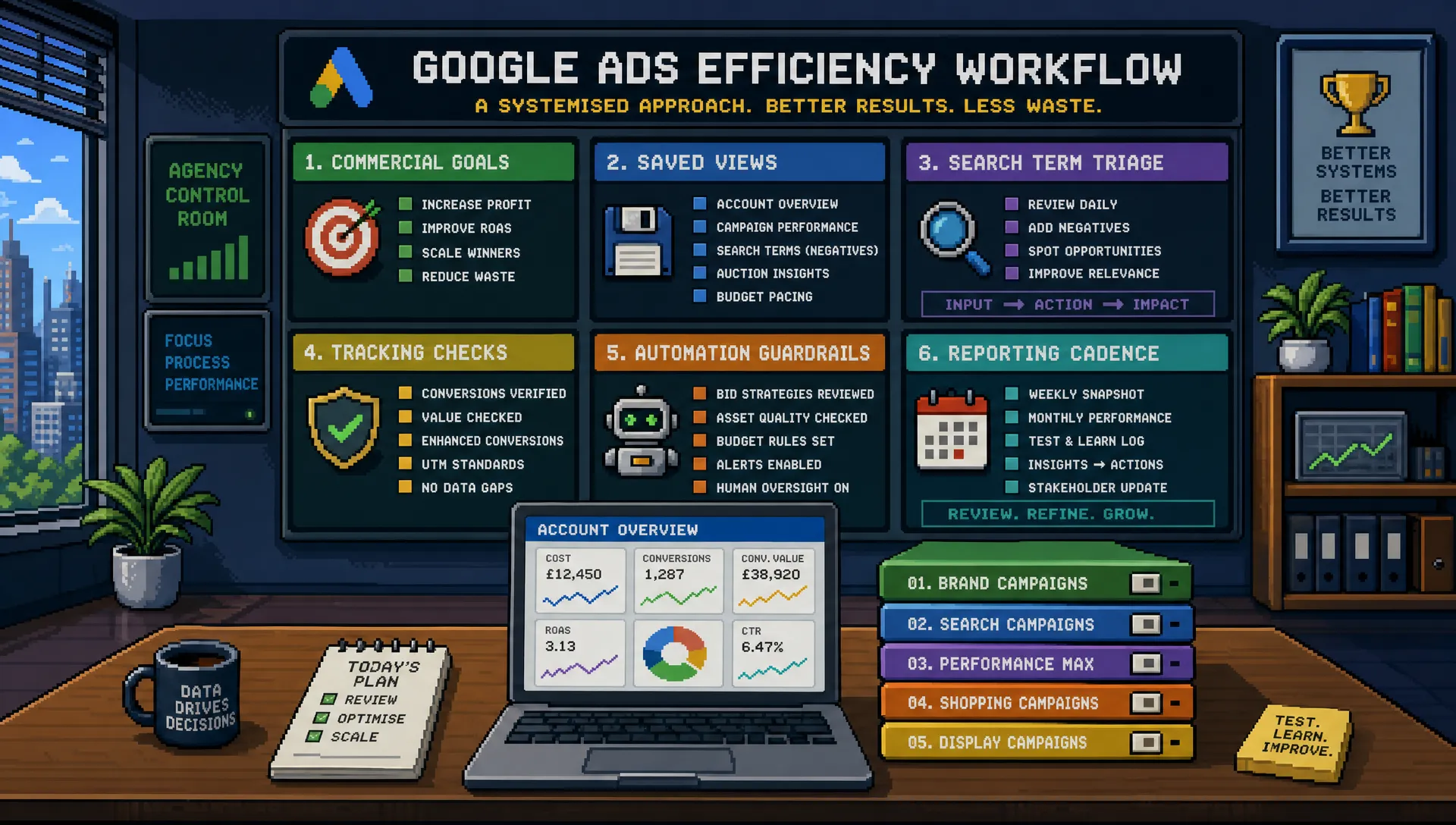
Most agencies do not lose time in Google Ads because the platform is impossible to use. They lose time because every account is approached slightly differently, every audit starts from scratch, and every optimisation session turns into a hunt through tabs, columns, recommendations and reports.
Using the Google Ads platform more efficiently is not about rushing. It is about reducing unnecessary decisions, surfacing the right problems faster, and creating a repeatable workflow that protects performance while saving senior time.
For agencies, this matters twice. Efficiency improves client results, but it also protects delivery capacity. A messy account can consume hours without producing better decisions. A well-run account tells you where to look, what has changed, and which actions are most likely to move the commercial outcome.
Start with the commercial goal before touching the interface
The fastest Google Ads users are not necessarily the people who know every menu. They are the people who know what they are looking for before they log in.
Before optimising an account, define the account’s commercial hierarchy. For lead generation, that may mean prioritising qualified enquiries, booked calls or sales accepted leads rather than every form fill. For ecommerce, it may mean focusing on profit-aware revenue, new customer acquisition, product margin or stock availability rather than revenue alone.
This step saves time because it prevents shallow optimisation. If an account treats all conversions as equally valuable, the platform may look efficient while the business outcome is poor. A campaign can have a low CPA and still generate weak leads. A product group can hit ROAS and still drain margin.
A simple starting framework helps:
| Decision area | Efficient question to answer first | Why it saves time |
|---|---|---|
| Conversion actions | Which actions should bidding actually optimise towards? | Prevents time spent improving the wrong metric |
| Budget | Which campaigns deserve protection, scaling or cuts? | Reduces reactive daily budget changes |
| Search intent | Which queries are commercially meaningful? | Speeds up search term reviews |
| Bidding | Is there enough reliable data for automation? | Avoids unnecessary bid strategy switching |
| Reporting | What does the client or stakeholder truly need to know? | Keeps analysis focused on decisions |
If this foundation is unclear, platform work becomes guesswork. If it is clear, every filter, column and recommendation can be judged against a real business objective.
Build a repeatable weekly operating rhythm
Many accounts are inefficient because they are managed in bursts. Someone logs in when performance drops, clicks through several reports, makes multiple changes, then repeats the process a few days later without a clear pattern.
A better approach is to use a consistent rhythm. This does not mean every account needs the same number of hours. It means each account should have a predictable management loop based on risk, spend and complexity.
For most agency-managed accounts, the rhythm can be split into four levels:
| Frequency | What to check | What to avoid |
|---|---|---|
| Daily or near daily | Disapprovals, spend anomalies, tracking breaks, major CPA or ROAS movement | Rebuilding campaigns based on one bad day |
| Weekly | Search terms, budgets, conversion quality, bid strategy status, asset issues | Changing every lever at once |
| Fortnightly | Landing page alignment, audience signals, creative fatigue, campaign experiments | Letting tests run without a decision date |
| Monthly | Strategic structure, budget allocation, market changes, competitor pressure | Reporting numbers without recommendations |
The key is to separate monitoring from optimisation. Monitoring checks whether the account is safe. Optimisation changes how the account performs. Mixing the two creates noise and often leads to over-management.
This is especially important for automated bidding. Smart Bidding needs stable signals. Constantly changing budgets, conversion actions, targets and campaign structure can make the platform less effective, even if each change looks sensible in isolation.
Use saved views, filters and columns so problems find you
One of the easiest ways to use Google Ads more efficiently is to stop rebuilding your workspace every time you enter an account.
Create saved column sets for different jobs. A lead generation optimisation view might include cost, conversions, cost per conversion, conversion rate, search impression share, lost impression share due to budget, lost impression share due to rank, top impression share and all conversions. An ecommerce view might prioritise conversion value, ROAS, average order value, product performance and value per click.
Then build filters around the decisions you make repeatedly. For example, instead of scrolling through campaigns, use filters that show:
- Campaigns with spend but no conversions over a meaningful time period
- Keywords or search terms with high cost and no conversion value
- Ads or assets with disapproval issues
- Campaigns limited by budget where performance is above target
- Campaigns with CPA or ROAS outside the agreed tolerance range
Labels are another underused efficiency tool. They are not just for organisation. Used properly, labels turn the account into a working system. You can label campaigns by priority, margin tier, funnel stage, test status, client approval status or seasonal relevance.
The aim is to create an account where the next action is visible quickly. If every session begins with manual investigation, the platform is controlling your workflow. If your filters and views surface risk automatically, you are controlling the platform.
Make campaign structure easier to manage, not just technically correct
A technically neat account is not always an efficient account. Too many campaigns, too many ad groups and too many small budget pockets can make optimisation slower and bidding less stable.
Modern Google Ads management often rewards simplification, but simplification should not mean dumping everything into one campaign. The efficient middle ground is to structure campaigns around meaningful differences: intent, budget control, geography, margin, conversion type, service line or sales priority.
Naming conventions also matter more than many teams realise. A clear naming system lets anyone understand the account quickly, which is essential in an agency environment where work may pass between account managers, strategists and specialists.
A practical naming convention might include channel, campaign type, market, product or service, match type or intent group, and objective. The exact format matters less than consistency.
If you are reviewing older accounts, it can also be useful to revisit the campaign structure fundamentals that still work in modern Google Ads, especially around intent separation, search term mining and conversion quality.
Stop wasting time in search terms
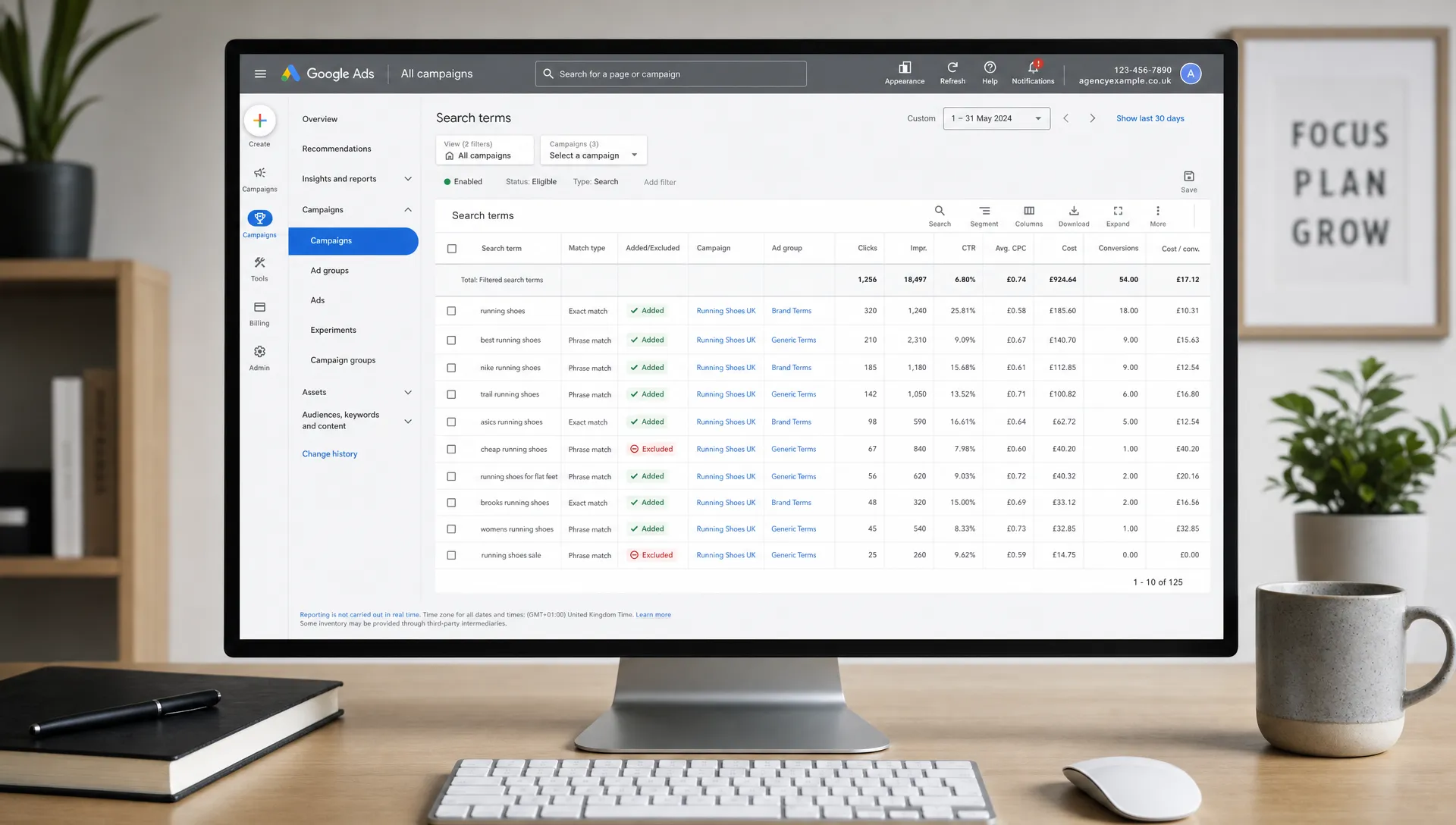
Search term analysis can easily become one of the biggest time drains in the Google Ads platform. The answer is not to ignore it, especially in Search campaigns. The answer is to review it with sharper filters.
Start with commercial risk. Look first at queries with spend and no conversions, irrelevant intent, misleading wording, competitor ambiguity, poor geographic fit or research intent that does not match the campaign goal.
Do not add negatives one by one without thinking about where they belong. A negative keyword added at ad group level may solve a small issue but miss the wider pattern. A shared negative list may save more time if the issue applies across multiple campaigns. Account-level negatives can also be useful where a term is clearly irrelevant to the whole business.
Efficiency also means knowing when not to act. A low-volume search term with one click may not deserve attention. A query with meaningful spend and repeated weak performance does.
For deeper budget protection, it is worth pairing this workflow with a process to cut wasted Google Ads spend quickly, especially when an agency inherits an account with broad match, weak negatives or unclear conversion tracking.
Treat Recommendations as prompts, not instructions
The Recommendations tab can be useful, but it should not become the account strategy.
Google explains that optimisation score is an estimate of how well an account is set to perform, scored from 0% to 100%, with recommendations intended to improve that score. That can be helpful, but the score does not know every commercial constraint, client margin, lead quality issue or internal sales process.
In practice, Recommendations are best treated as prompts. They may highlight missed extensions, budget constraints, audience opportunities, bidding options or keyword expansion ideas. Some will be useful. Some will be irrelevant. Some may increase spend without improving the client’s real outcome.
Be especially careful with auto-apply settings. They can save time in mature accounts with clear guardrails, but they can also create hidden changes that complicate performance analysis. If auto-apply is used, document what is enabled and review change history regularly.
A senior workflow is simple: review recommendations, accept only what matches the account strategy, dismiss what does not, and record material changes.
Speed up builds with templates, Google Ads Editor and shared assets
Efficiency is not only about optimisation. It also comes from faster, cleaner campaign builds.
For agencies, templates are essential. Campaign launch briefs, keyword maps, ad copy formats, UTM structures, naming conventions, negative keyword starters and QA checklists reduce launch time and prevent avoidable mistakes.
Google Ads Editor is still one of the most useful tools for bulk work. It helps with offline edits, large-scale copy changes, campaign duplication, bulk keyword updates and faster QA before posting changes. It is particularly useful when building multiple campaigns or making structured edits across similar ad groups.
Shared assets also save time. Sitelinks, callouts, structured snippets, image assets and audience segments should not be rebuilt manually every time. Where appropriate, use shared libraries and account-level assets to keep messaging consistent.
For Performance Max and Demand Gen workflows, efficiency often comes from better preparation before entering the platform. Product feeds, creative assets, audience signals, search themes, landing pages and brand rules should be checked before launch. Otherwise, the build becomes a series of interruptions.
Use automation to protect judgement, not replace it
Automation can make Google Ads management faster, but only when it is applied to defined problems. Automating unclear decisions creates unclear outcomes at scale.
Automated rules are useful for alerts, safeguards and routine checks. Scripts can help with larger accounts, recurring audits or anomaly detection. Smart Bidding can be powerful when conversion data is reliable and the account has enough volume. The mistake is assuming that all automation is automatically efficient.
A sensible automation framework looks like this:
| Automation type | Good use case | Risk to watch |
|---|---|---|
| Automated rules | Alerting on disapprovals, spend spikes or paused campaigns | Rules firing without context |
| Scripts | Repeated checks across large accounts | Poor maintenance or outdated logic |
| Smart Bidding | Optimising towards reliable primary conversions | Weak tracking or mixed conversion quality |
| Auto-apply recommendations | Low-risk hygiene updates in controlled accounts | Strategy changes happening unnoticed |
| Budget pacing alerts | Spotting overspend or underspend early | Reacting before enough data has accrued |
The principle is straightforward. Use automation to catch problems faster, enforce guardrails and reduce repetitive checks. Keep commercial judgement with the human managing the account.
Make conversion tracking easier to diagnose
No platform workflow is efficient if tracking is unreliable. You can optimise quickly and still move in the wrong direction if conversion data is inflated, duplicated or incomplete.
Within Google Ads, conversion actions should be cleanly organised. Primary actions should reflect the outcomes used for bidding. Secondary actions can still be useful for observation, but they should not distort automated bidding unless there is a deliberate reason.
Use the conversion action table regularly. Check status, recent activity, counting method, attribution settings and whether imported actions from GA4 are behaving as expected. If lead quality matters, consider how offline conversion imports or CRM feedback could improve bidding signals, if the client has the operational setup to support it.
Change history is also valuable when diagnosing tracking issues. If conversions suddenly spike or disappear, check whether tags, goals, consent settings, attribution, landing pages or form flows changed around the same time.
This is one reason agency teams should define what professional Google Ads management should include before work begins. Tracking, measurement and commercial interpretation are not admin tasks. They are core performance controls.
Improve reporting inside Google Ads before exporting data
Many teams export data too early. Spreadsheets and dashboards have their place, but Google Ads itself can answer many questions quickly if the right segments and columns are used.
Before exporting, segment performance by device, network, conversion action, time, location and audience where relevant. Compare date ranges carefully, but avoid overreacting to short windows if the account has low volume.
Custom columns can also make the platform more useful. For example, an agency might create columns for qualified lead rate, blended CPA, non-brand CPA, profit proxy or budget pacing. These depend on the data available, but the point is to bring decision-ready metrics closer to the campaign view.
The platform’s Insights section can be useful for spotting demand changes, auction movement and audience patterns. As with Recommendations, it should inform decisions rather than dictate them.
Efficient reporting answers three questions:
- What changed?
- Why did it probably change?
- What should we do next?
If a report does not answer those questions, it may be accurate but not useful.
Keep a clean change history
Efficient Google Ads management depends on knowing what changed and when. This is especially important when multiple people have access to the same account.
Avoid making too many unrelated changes in one session. If CPA improves or worsens afterwards, it will be difficult to isolate the cause. Group related changes together and use clear timing. For bigger tests, use experiments where possible rather than changing live campaigns without a comparison.
Annotations and external notes can also help. A simple account log that records major budget changes, bid strategy changes, tracking updates, landing page changes and client-side events can save hours during performance reviews.
This matters in agency delivery because account context is fragile. A clean change history allows another specialist to step in without spending half a day reconstructing what happened.
Create an agency-level Google Ads efficiency checklist
The highest efficiency gains usually come from standardising the work around the platform, not from memorising more shortcuts.
A practical agency checklist should cover:
- Account access, billing and permissions
- Conversion tracking and GA4 checks
- Naming conventions and campaign structure rules
- Default column sets and saved filters
- Negative keyword and search term review process
- Budget pacing and approval rules
- Recommendation review policy
- Launch QA before campaigns go live
- Reporting format and decision cadence
- Escalation rules for urgent issues
This checklist should be short enough to use and specific enough to prevent mistakes. If it becomes a 40-page document nobody opens, it will not improve efficiency.
For agencies under pressure, the most valuable checklist items are usually the ones that prevent rework: tracking validation, launch QA, budget checks and clear client approval points.
Know when efficiency means getting help
There is a point where better workflows are not enough. If an agency has too many accounts, too many urgent launches or not enough senior PPC capacity, the Google Ads platform will feel inefficient because the delivery model is stretched.
In that situation, the answer may not be more internal process. It may be specialist execution support.
White-label PPC support can be useful when an agency needs senior Google Ads delivery without hiring, training or committing to long contracts. It can also help protect account quality during busy periods, staff absence, client onboarding or rapid scaling.
The important point is to avoid letting overloaded teams turn Google Ads management into reactive button-clicking. The platform rewards disciplined judgement. If your team does not have the time to provide that consistently, performance and margin both suffer.
Frequently Asked Questions
What is the fastest way to use the Google Ads platform more efficiently? Start by standardising your workflow. Use saved columns, filters, labels, naming conventions and a weekly optimisation rhythm so you are not rebuilding your process every time you log in.
Should I apply Google Ads Recommendations automatically? Not by default. Recommendations can be useful, but they should be reviewed against the client’s commercial goal, tracking quality and account strategy. Auto-apply should only be used with clear guardrails.
How often should agencies check Google Ads accounts? It depends on spend, risk and account complexity. Many accounts benefit from daily safety checks, weekly optimisation, fortnightly testing reviews and monthly strategic reviews.
Does automation make Google Ads management more efficient? Yes, when used for alerts, safeguards, bidding and repetitive checks with reliable data. It becomes risky when it replaces commercial judgement or makes hidden changes without review.
Why does conversion tracking affect platform efficiency? Poor tracking wastes time because every optimisation decision becomes unreliable. Clean primary and secondary conversion actions, regular diagnostics and clear change history make decisions faster and safer.
Need senior Google Ads execution without adding headcount?
If your agency needs more Google Ads capacity but does not want recruitment delays, long-term contracts or junior delivery risk, PPC Ghost provides on-demand white-label PPC support for agencies.
You keep the client relationship. PPC Ghost supports execution across Google Ads, Meta Ads, Microsoft Ads, GA4 and tracking, with senior-only expertise and flexible pay-as-you-go support when you need extra hands behind the scenes.