Meta Ads Facebook Setups That Reduce Wasted Spend
Reduce wasted spend in Meta Ads Facebook campaigns with smarter tracking, structure, budgets, exclusions and creative testing for agencies.
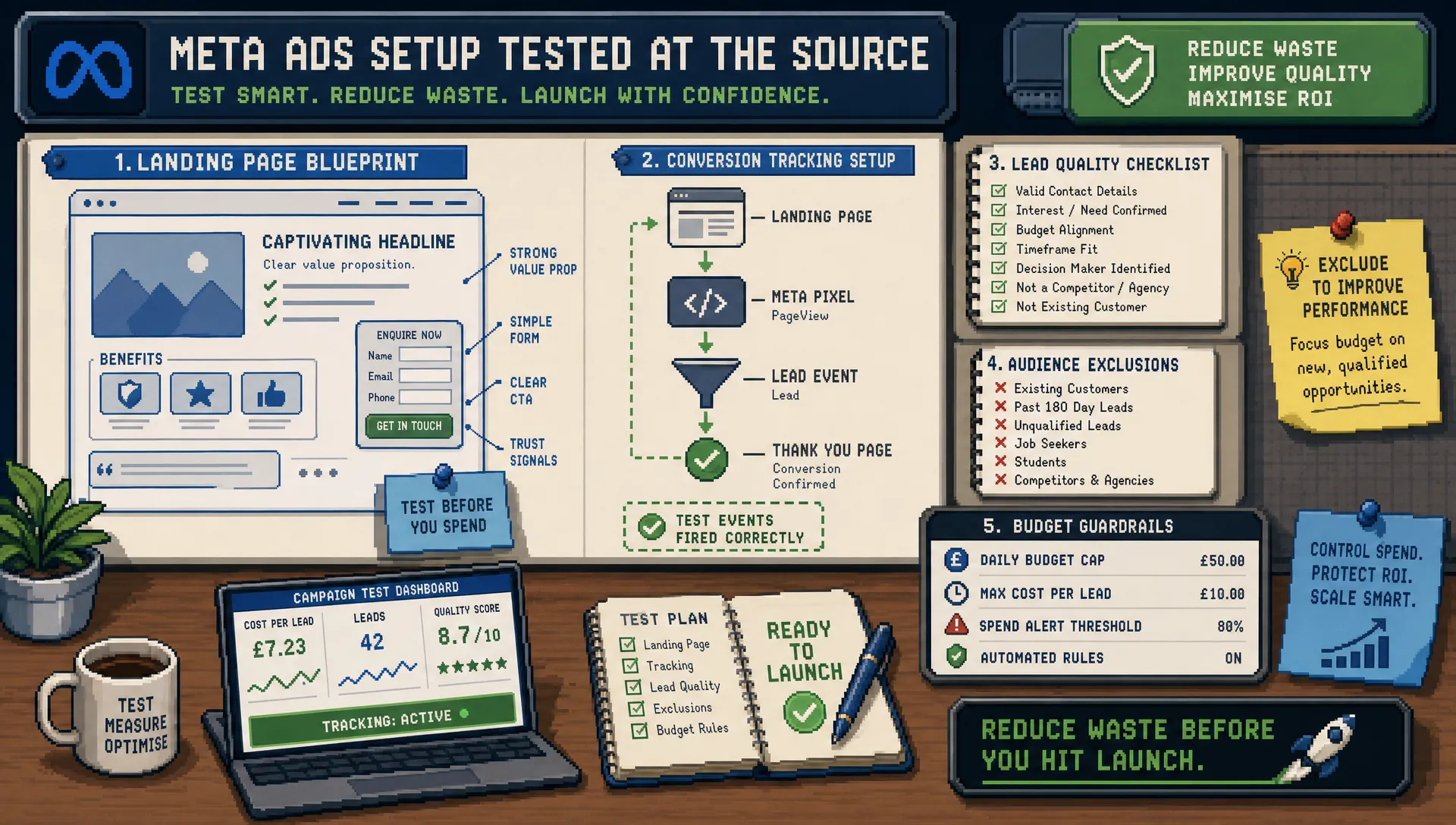
Wasted spend in Meta Ads rarely comes from one dramatic mistake. It usually leaks out through small setup choices: a conversion event that is too soft, a retargeting pool that includes recent customers, an ad set split that starves the algorithm, or a lead form that rewards volume over quality.
For agencies, that waste is doubly painful. The client sees spend going out every day, but the agency has to explain why reported leads, purchases or enquiries are not turning into revenue. Better optimisation helps, but the real win often happens before the campaign goes live.
A stronger Meta Ads Facebook setup gives the platform cleaner signals, reduces obvious mismatches, and makes performance easier to judge. This guide focuses on practical setup decisions that cut waste without overcomplicating the account.
Start with the conversion you actually want
The most expensive Meta setup mistake is optimising for an action that is easy to get but commercially weak.
If a campaign is meant to generate sales calls, optimising purely for landing page views may make the dashboard look busy while budget flows towards people who browse and leave. If the campaign is meant to drive ecommerce revenue, optimising for add-to-cart can be useful at low volume, but it can also steer spend away from purchasers if left in place too long.
Before building the campaign, define the business outcome and the closest reliable conversion event Meta can see. For many accounts, that might be a purchase, completed lead form, booked appointment, qualified lead, or trial sign-up. The key word is reliable. A perfect event that fires inconsistently is worse than a slightly softer event that fires cleanly.
For lead generation, agencies should be especially careful. A form submit is not the same as a qualified enquiry. If possible, connect back-end quality signals through CRM imports, offline conversions or server-side tracking. Meta’s Conversions API exists to help advertisers create a more direct connection between marketing data and Meta systems, which can improve signal resilience when browser tracking is limited.
A practical agency setup should confirm these basics before spend starts:
- The pixel is installed on the correct domain and firing on the intended pages.
- The conversion event matches the campaign objective and client goal.
- Test events have been checked before launch.
- GA4 or another analytics tool is using consistent UTMs for cross-checking.
- The client understands that Meta attribution and CRM revenue may not match exactly.
- Duplicate events are avoided, especially where browser and server events both exist.
This is also where many agency-side mistakes begin. If you want a broader view of process issues that cause underperformance, the PPC Ghost guide to Facebook Meta Ads mistakes agencies still make covers weak briefs, tracking gaps and reporting problems in more detail.
Build around campaign intent, not internal preferences
A clean Meta Ads account is not necessarily a minimal account. It is an account where every campaign has a reason to exist.
Many accounts waste spend because campaigns are built around historic habits rather than current intent. One campaign targets cold audiences, another targets interests, another duplicates lookalikes, another retargets everyone who visited the site, and a final campaign promotes a discount to people who already bought. The result is audience overlap, weak learning, and budget spread across too many small pockets.
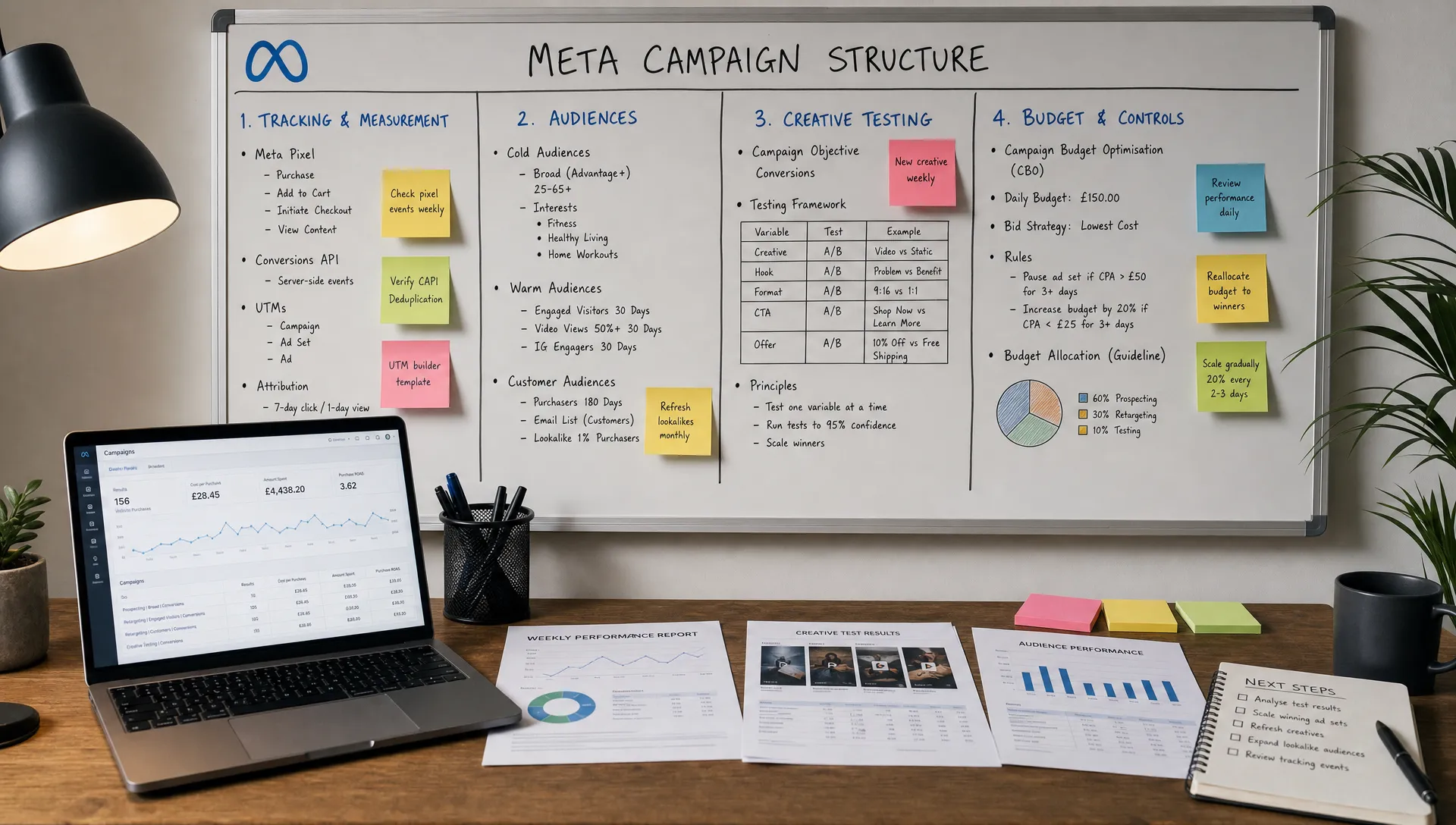
Instead, map campaigns to the role they play in the buyer journey. A simple structure often performs better than a clever one because Meta has more conversion data to learn from.
| Campaign role | Typical objective | Common waste risk | Setup improvement |
|---|---|---|---|
| Prospecting | Sales, leads or conversions | Too many tiny ad sets with weak data | Consolidate where possible and test clear creative angles |
| Retargeting | Sales, leads or conversions | Showing ads to recent converters or low-intent visitors | Use exclusions and time windows that match the buying cycle |
| Lead nurture | Leads or conversions | Optimising for cheap leads rather than qualified prospects | Add qualifying questions or feed quality data back where possible |
| Creative testing | Sales, leads or conversions | Killing ads before enough data is collected | Test distinct concepts, not tiny visual variations |
| Offer campaigns | Sales or leads | Discounting to people who would have converted anyway | Separate new prospects from existing customers where practical |
The best structure depends on budget, conversion volume and buying cycle. A national ecommerce brand with hundreds of weekly purchases can support more segmentation than a local B2B service with ten good enquiries a month.
The rule is simple: if a campaign or ad set does not have enough budget and event volume to learn, it is probably a reporting preference rather than a performance asset.
Use audience exclusions to stop paying for the wrong people
Meta’s targeting has become more automated over time, which means exclusions are often just as important as inclusions. Broad targeting can work well, but not if the account is repeatedly paying to reach people who cannot or should not convert.
This matters most when the client has obvious non-buyers. A recruitment agency may not want jobseekers in an employer-focused campaign. A local service business may not want enquiries outside its service area. A SaaS company may want to exclude current customers from acquisition campaigns.
Useful exclusions often include existing customers, recent purchasers, employees, unqualified lead lists, recent form submitters, and locations the client cannot serve. For ecommerce, exclude recent buyers from acquisition campaigns unless there is a clear repeat-purchase strategy. For lead generation, exclude recent leads long enough for the sales team to follow up before paying to reach them again.
Retargeting also needs discipline. A 180-day website visitor audience sounds valuable, but not every visitor is equally useful. Someone who viewed a pricing page yesterday is not the same as someone who bounced from a blog post five months ago. If the budget is limited, prioritise stronger intent signals first.
Good retargeting setup usually considers recency, behaviour and exclusions. Poor retargeting setup treats every visitor as equally close to buying.
Give the algorithm enough room, but not unlimited freedom
There is a tension in modern Meta Ads setup. Over-control can fragment data and increase costs. Too little control can send budget into weak placements, weak geographies or low-quality inventory.
The answer is not to manually restrict everything from day one. The answer is to decide which controls are commercially essential and which can be tested.
For example, Advantage+ placements can often help Meta find lower-cost opportunities across Facebook, Instagram, Messenger and Audience Network. But if lead quality is consistently poor from a placement, or if creative is clearly unsuitable for a certain environment, it is reasonable to review the breakdown and adjust. Do not assume every low-cost impression is useful.
Location settings deserve the same scrutiny. Agencies working with UK businesses should confirm whether the campaign is targeting the right countries, regions, cities or radius areas. For local lead generation, wasted spend often comes from loose geography, vague copy, or landing pages that do not clearly state service coverage.
Language is another overlooked setup detail. If the ads, landing page and sales process are in English, but the targeting includes users who cannot reasonably convert, performance may suffer even if click metrics look cheap.
The best setup gives Meta enough flexibility to optimise while protecting the client from obvious waste. Think of it as guardrails, not micromanagement.
Set budgets that match the learning requirement
Budget setup is not just a finance decision. It affects how quickly Meta can learn and how stable performance becomes.
Many agencies inherit accounts where a small monthly budget is split across too many campaigns, ad sets and ads. Each part receives just enough spend to produce noise, but not enough to produce reliable learning. The client then asks why performance is inconsistent, and the agency is forced to optimise based on incomplete data.
A better setup starts by asking how many meaningful conversion events the account can realistically generate. If the budget cannot support multiple campaigns, simplify. If the audience is small, do not create six retargeting ad sets. If the offer is unproven, do not launch ten creative concepts with tiny budgets and expect a clear winner.
Meta’s learning phase is designed to improve delivery as the system gathers optimisation events. While not every ad set will exit learning quickly, frequent major edits, low event volume and fragmented budgets can keep performance unstable. Agencies should avoid daily structural changes unless there is a clear reason, such as a tracking fault or obvious policy issue.
A useful budget principle is to separate testing from scaling. During testing, the goal is to identify signals without pretending early data is final. During scaling, the goal is to increase spend gradually around what is already working. Blending those two phases often causes waste because the account is asked to learn and scale at the same time.
Make creative setup measurable, not just attractive
Creative is one of the largest drivers of Meta performance, but many accounts test it badly.
The common mistake is to upload several ads that are visually different but strategically identical. Three lifestyle images with the same headline, same offer and same landing page are not three meaningful tests. They are variations of one idea.
A stronger setup gives each creative a clear hypothesis. One ad might test a pain-point angle. Another might test social proof. Another might test a direct offer. Another might test a product demonstration. When results come in, the agency can learn which message is moving the right audience, not just which image received cheaper clicks.
For lead generation, creative should also pre-qualify. If the ad promises something too broad, the campaign may attract people who are curious but unsuitable. Clear pricing cues, location cues, eligibility criteria or service details can reduce lead volume, but increase lead quality.
This is where agencies sometimes need to push back on clients. The cheapest lead is not always the best lead. If vague creative halves the cost per lead but doubles the sales team’s wasted time, it has not improved performance.
Naming conventions help here. Use ad names that describe the angle, format and offer. Six weeks later, nobody wants to interpret “Ad 3 final v2”. A campaign setup that is easy to read is easier to optimise.
Choose forms and landing pages based on quality, not convenience
Meta instant forms can be excellent for reducing friction, especially on mobile. They can also generate poor-quality leads if the setup asks too little from the user.
For low-consideration offers, a short form may be fine. For high-value services, finance, property, B2B or complex purchases, extra qualification can save money downstream. Meta lead forms allow advertisers to add custom questions and use higher-intent formats, which can help filter out accidental or low-commitment submissions.
Landing pages have their own risks. A slow page, unclear offer, weak mobile layout or mismatched message can waste otherwise good traffic. If the ad says “free consultation for UK ecommerce brands” but the landing page opens with generic agency copy, users have to work too hard to understand relevance.
A good landing page or lead form setup should answer three questions quickly:
- Who is this for?
- What happens after I submit my details?
- Why should I trust this business enough to take the next step?
The smoother the handover from ad to page to sales process, the less budget is wasted on confused or mismatched users.
Separate reporting metrics from optimisation decisions
Meta Ads Manager gives agencies plenty of numbers, but not all numbers should drive decisions.
A campaign with a low cost per lead may still be wasting spend if the client cannot contact those leads. An ad with a high click-through rate may still fail if it attracts the wrong intent. A retargeting campaign may show a strong return while taking credit for users who were already about to convert.
This is why setup should include a reporting framework before launch. Decide which metrics are diagnostic and which are commercial. CPM, CTR and CPC can explain delivery, but they do not prove business value. Cost per qualified lead, purchase value, booked calls, close rate and revenue are usually closer to the truth.
Attribution should also be explained early. Meta, GA4 and a client CRM may report different results because they use different attribution rules, windows and data sources. That does not mean one system is useless. It means the agency needs a consistent decision-making framework.
For agencies managing multiple paid channels, this distinction matters. Meta is often stronger at demand creation, while search captures more active demand. The PPC Ghost comparison of Google Ads vs Meta Ads for agency growth explains how those roles differ and why clients should not judge every platform by the same signals.
Use a pre-launch checklist to catch waste before it starts
A pre-launch checklist may feel basic, but it is one of the easiest ways to reduce wasted spend. Most costly errors are not sophisticated. They are missed exclusions, wrong URLs, broken UTMs, duplicated events, weak naming or campaigns launched with the wrong objective.
| Setup area | Question to ask before launch | Waste prevented |
|---|---|---|
| Objective | Does the campaign optimise for the closest reliable business action? | Spend on low-intent actions |
| Tracking | Have pixel, events, UTMs and analytics been tested? | Misreported or unoptimisable conversions |
| Audience | Are customers, recent leads and irrelevant groups excluded where needed? | Paying for people who should not see the ad |
| Geography | Does targeting match the client’s actual service area? | Leads or sales from unusable locations |
| Creative | Does each ad test a distinct message or offer? | Budget spread across duplicate concepts |
| Budget | Is spend consolidated enough to generate useful data? | Learning instability and noisy results |
| Destination | Does the form or landing page match the ad promise? | Clicks that fail to convert or qualify |
| Reporting | Are commercial success metrics agreed with the client? | Optimising towards vanity metrics |
If campaign speed is the bigger operational challenge, the PPC Ghost article on Meta Ads Manager tips for faster campaign launches is a useful companion. Faster launches are valuable, but only when the setup is clean enough to avoid avoidable rework.
Reduce waste by changing fewer things, more deliberately
Once campaigns are live, agencies often feel pressure to prove they are “doing something”. That can lead to constant edits, frequent budget changes, new ad sets, paused ads, relaunched campaigns and shifting objectives.
Activity is not the same as control.
A good setup makes optimisation calmer because the account is easier to diagnose. If tracking is clean, campaign roles are clear, audiences are sensible and creative tests have defined hypotheses, you can make fewer changes with more confidence.
When performance drops, investigate in order. Check tracking first. Then review delivery, budget changes, creative fatigue, audience saturation, placement breakdowns, landing page issues and sales feedback. Do not rebuild the whole account because one bad day appears in Ads Manager.
The best Meta advertisers are not passive, but they are patient enough to let data become meaningful.
Frequently Asked Questions
What is the best Meta Ads Facebook setup for reducing wasted spend? The best setup is one that aligns the campaign objective with a reliable business conversion, uses clean tracking, avoids unnecessary audience fragmentation, applies sensible exclusions, and tests creative ideas with clear hypotheses.
Should agencies use broad targeting or detailed targeting on Meta? Broad targeting can work well when tracking, creative and conversion volume are strong. Detailed targeting may still be useful for specific offers, but over-segmentation often limits learning and increases waste.
How do lead generation campaigns waste budget on Facebook and Instagram? Lead campaigns often waste budget when forms are too easy to complete, creative is too vague, sales follow-up is slow, or optimisation focuses on cheap leads rather than qualified opportunities.
Are Meta instant forms better than landing pages? Neither is always better. Instant forms reduce friction and can increase volume, while landing pages can provide more context and qualification. The right choice depends on offer complexity, lead quality and the client’s sales process.
How often should Meta campaigns be changed after launch? Avoid making major changes every day unless something is clearly broken. Frequent edits can disrupt learning and make results harder to interpret. Review data on a consistent schedule and make deliberate changes based on enough evidence.
Need senior Meta Ads support without adding headcount?
If your agency needs cleaner setups, faster troubleshooting or extra delivery capacity, PPC Ghost provides white-label PPC support for Google, Meta and Microsoft Ads. It is built for agencies that need senior execution on demand, without recruitment delays or long-term contracts.
For campaign builds, tracking checks, account clean-ups or overflow support, you can explore white-label PPC help from PPC Ghost and keep client delivery moving while your agency stays front and centre.