Microsoft Search Ads Tips for B2B Agency Accounts
Microsoft Search Ads tips for B2B agency accounts: improve lead quality, reduce waste, use LinkedIn targeting and track pipeline.
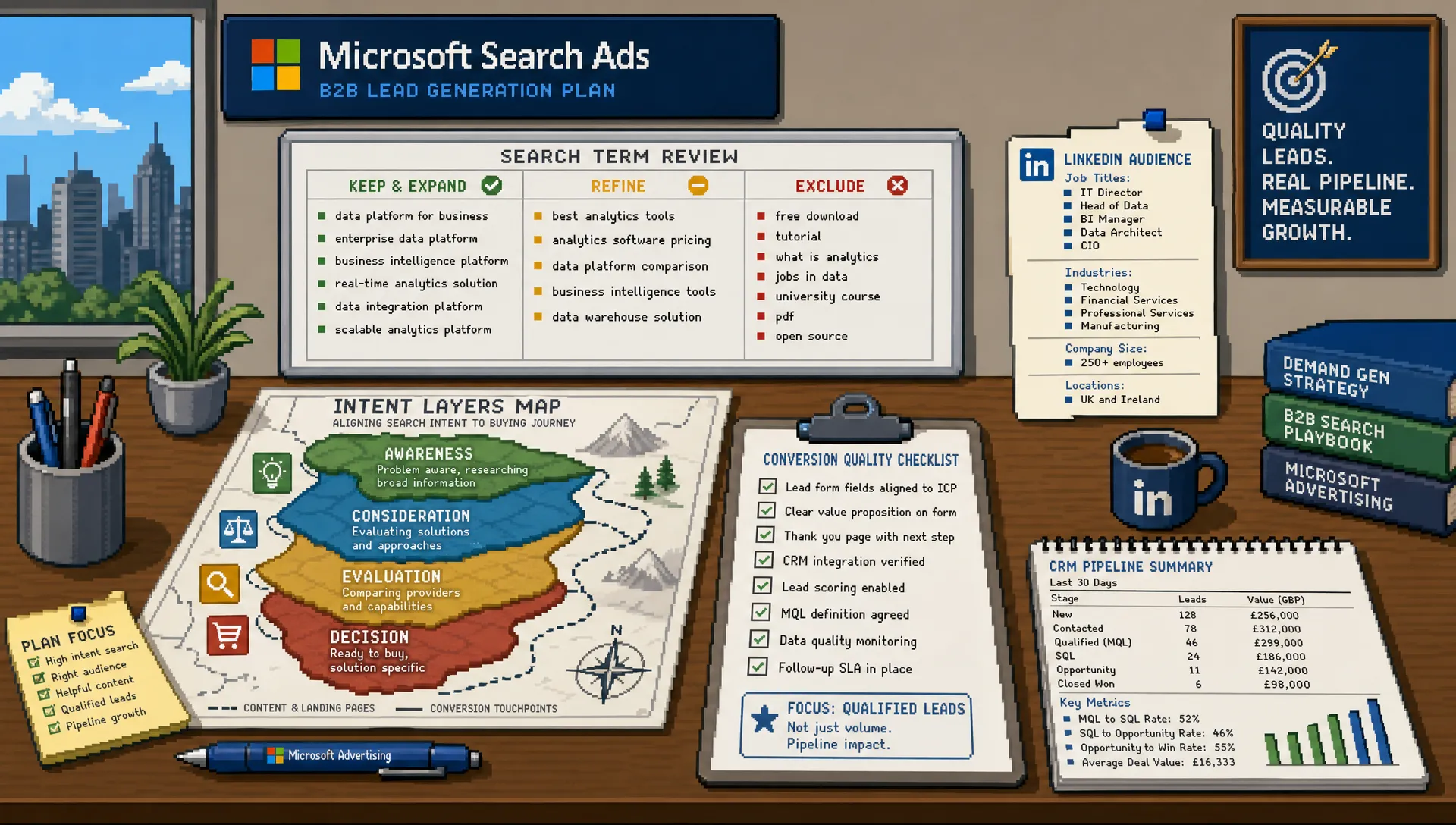
Microsoft Search Ads can quietly become one of the most efficient places to find B2B leads, but only when they are managed as their own channel rather than a Google Ads afterthought. For agency accounts, the opportunity is not simply cheaper clicks. It is the chance to capture high intent searches from professionals who may be browsing through Bing, Edge, Windows devices and Microsoft partner inventory during the working day.
The catch is that B2B accounts are rarely forgiving. Sales cycles are longer, lead quality is scrutinised, and one irrelevant query can spend more than a small campaign should lose in a week. If your agency is adding Microsoft Search Ads for a client, the goal should be disciplined incremental growth, not a rushed import and a hopeful launch.
The tips below are written for agency teams managing B2B accounts, especially where the client expects pipeline, not just form fills.
Why Microsoft Search Ads deserve separate B2B treatment
Microsoft Advertising often sits behind Google in agency priority lists. That is understandable, because Google usually has more search volume. But B2B PPC is not always about maximum volume. It is often about finding enough qualified prospects at an acceptable cost while protecting the client’s budget from broad, low intent traffic.
Microsoft Search Ads can be especially useful when a client already has search demand but Google Ads is expensive, limited by competition, or constrained by budget. The platform also gives agencies access to audience options that are particularly relevant for B2B, including LinkedIn profile targeting in eligible campaign types and markets.
For UK agencies, Microsoft Ads should usually be positioned as an incremental search channel. It is not a replacement for Google, and it is not a low effort bolt-on. If you need a broader planning view before getting tactical, PPC Ghost has also covered Microsoft Ads strategies UK agencies should use to improve lead quality and create additional PPC revenue.
Start with the client’s sales reality, not the campaign import
The fastest way to launch Microsoft Search Ads is to import from Google Ads. The most reliable way to make them profitable is to slow down first and understand the client’s sales process.
Before touching campaign settings, confirm what a useful B2B lead actually looks like. A SaaS client may care about booked demos from companies with a minimum seat count. A professional services firm may want enquiries from finance directors, operations leads or business owners. A manufacturer may value distributor leads differently from end user enquiries.
Ask these questions before building the account:
- Which sectors, company sizes and job roles are genuinely valuable?
- Which enquiries look good in the platform but rarely become opportunities?
- Which locations can the sales team actually serve?
- What is the typical time from click to lead, opportunity and closed deal?
- Which conversion actions should influence bidding, and which should only be observed?
- Are there CRM stages or offline conversions that can be fed back into reporting?
This matters because B2B Microsoft Search Ads often run on lower volume. If you optimise towards the wrong action, the platform has fewer chances to correct course. A small number of poor conversions can distort bidding, reporting and client confidence.
Use Google imports as a shortcut, not a strategy
Importing Google Ads campaigns into Microsoft Advertising can save time, especially for agencies managing multiple clients. But imports can also transfer problems, or create new ones if settings behave differently across platforms.
Use imports for structure and speed, then manually review every campaign before it goes live.
| Imported element | What can go wrong | Agency action |
|---|---|---|
| Campaign budgets | Google budgets may be too high for Microsoft search volume or client test appetite | Relaunch with controlled budgets based on expected demand and commercial risk |
| Match types | Broad match or loose phrase match can spend quickly in niche B2B categories | Start tighter, then expand once search term quality is proven |
| Location targeting | National campaigns may include regions the client cannot serve well | Confirm sales coverage, delivery locations and exclusions |
| Negative keywords | Google negatives may miss Microsoft specific search patterns | Build a launch negative list and review search terms early |
| Conversion goals | Imported goals may include weak actions such as page views or soft sign-ups | Separate primary lead goals from secondary engagement signals |
| Ad assets | Sitelinks, callouts and images may be outdated or too generic | Rewrite assets around B2B buying objections and proof points |
| Tracking templates | URL parameters may not align with agency reporting or GA4 naming | Test every final URL and UTM before launch |
A good rule for agency workflows is simple: import, pause, inspect, then launch. Do not let a scheduled import overwrite changes without someone owning the review.
Structure campaigns around B2B intent
B2B search accounts perform best when campaign structure reflects intent, not just keyword categories. This is especially important in Microsoft Search Ads because volume can be thinner. Over-segmentation may leave campaigns with too little data, while under-segmentation can mix high value searches with research traffic.
Think in intent layers:
| Intent layer | Example search behaviour | Best use in B2B accounts |
|---|---|---|
| Brand | Searches for the client’s company or product name | Protect demand and control the message, especially if competitors bid on the brand |
| Competitor | Searches comparing named providers | Use carefully with compliant copy and realistic budgets |
| Category | Searches for a known solution, such as CRM consultant or managed IT support | Core lead generation, usually the main budget focus |
| Problem | Searches describing a pain point, such as reduce warehouse downtime | Useful for education led B2B, but needs tighter qualification |
| Local or regional | Searches including city, county or UK modifiers | Strong for service businesses with defined coverage |
| High friction commercial | Searches including pricing, quote, supplier, agency or implementation | Often lower volume, but usually closer to sales conversation |
For many agency accounts, the best launch structure is not complicated. A small set of tightly themed campaigns with clear budget control will usually outperform a sprawling account copied from Google. You can always expand once search terms and conversion quality justify it.
Use LinkedIn profile targeting without narrowing too far
One of Microsoft Advertising’s most useful B2B advantages is the ability to layer LinkedIn profile data, such as company, industry and job function, where available. This can help agencies refine bids and understand which professional audiences are interacting with search campaigns.
The mistake is treating LinkedIn profile targeting as a magic B2B filter. Search intent still comes first. A senior operations director searching for a student template is still a poor prospect. A junior employee searching for enterprise procurement software may be doing valid research for a buying committee.
Use LinkedIn profile targeting to add context, not to replace keyword discipline. For example, you might apply stronger bids to industries that match the client’s best customers, or review job function performance to understand whether campaigns are reaching operational, finance or technical audiences.
Keep the first test simple. Select a small number of relevant industries or job functions, monitor lead quality, and avoid building so many audience layers that the account cannot gather meaningful data.
Control search terms faster than you would on Google
B2B search waste is expensive because the clicks are often costly and the conversion volume is limited. In Microsoft Search Ads, agency teams should review query quality quickly after launch, then settle into a routine based on spend and risk.
The first week matters. Look for consumer intent, job seekers, students, free resource searches, supplier research and irrelevant geographies. Some of these searches may be harmless in a high volume ecommerce account, but they can seriously dilute B2B performance.
Common negative keyword themes for B2B accounts include:
- Jobs, careers, salary, training and internships
- Free, template, sample, PDF and examples, unless the strategy includes lead magnets
- DIY, how to, definition and meaning, unless the client sells education or advisory services
- Consumer use cases that do not match the client’s offer
- Locations the client cannot serve or does not want to prioritise
- Competitor names that create legal, brand or quality concerns
Also check Microsoft search partner performance if the account uses partner inventory. Some partner traffic can be useful, but it should earn its place through conversion quality. If a publisher source creates low quality leads or suspicious engagement, review exclusion options and budget allocation.

Write ads for buying committees, not just clicks
B2B ads should reduce uncertainty. A vague ad can win the click, but it may also invite enquiries from people who are not a fit. Your job is not to maximise every possible visit. It is to attract the right conversation.
Strong B2B search ads usually clarify who the offer is for, what problem it solves and why the provider is credible. Instead of relying on generic claims such as leading solution or expert team, use specific angles that match the client’s sales positioning.
Good ad messaging can highlight:
- Industry specialism, such as support for SaaS, construction, finance or professional services
- Commercial outcome, such as fewer manual processes, clearer reporting or faster response times
- Delivery model, such as UK based support, implementation help or managed service
- Buying reassurance, such as audits, consultations, demos, case studies or transparent next steps
- Qualification signals, such as B2B, enterprise, multi-site, regulated sector or minimum project size
Responsive search ads should include variety, but not chaos. Give the system useful combinations by writing headlines that each carry a distinct role. Some should speak to the problem, some to the solution, some to proof and some to action.
For agency account managers, this is also where client input matters. If the client’s sales team rejects certain lead types, put that learning into the ad copy. A line such as for UK manufacturers or for B2B SaaS teams may reduce click volume, but improve fit.
Make tracking fit the length of the B2B buying journey
Tracking is where many promising B2B accounts become hard to judge. Microsoft Search Ads may produce leads, but the platform will not know whether those leads became opportunities unless the agency and client set up the right measurement process.
At minimum, use Microsoft’s Universal Event Tracking tag and make sure GA4 or the client’s analytics setup records the same journey clearly. Test forms, phone calls, booking tools, thank you pages and any third party landing page tools before launch. If tracking fails, early optimisation decisions become guesswork.
The bigger issue is conversion quality. Not every conversion should be treated equally.
| Conversion action | Should it be tracked? | Should it usually guide bidding? |
|---|---|---|
| Contact form submission | Yes | Yes, if spam and duplicates are filtered |
| Booked demo or consultation | Yes | Yes, often a stronger primary action |
| Phone call from ad or landing page | Yes | Yes, if call duration and relevance are reviewed |
| PDF download or webinar sign-up | Yes | Usually secondary, unless proven to create pipeline |
| Newsletter sign-up | Yes | Usually secondary |
| Page view or time on site | Sometimes | Rarely for B2B lead generation |
If the client has a CRM, push for offline feedback. Even a simple monthly review of lead status can improve decisions. Which campaigns produced sales accepted leads? Which keywords created enquiries that never matched the target buyer? Which forms attracted existing customers, students or suppliers?
For agencies under pressure to prove value quickly, measurement discipline is a commercial defence. PPC Ghost’s guide to PPC ads best practices for agencies under pressure is a useful companion if you need to protect tracking, budgets and client confidence across multiple paid media accounts.
Budget and bidding tips for low volume B2B accounts
Many B2B Microsoft Search Ads accounts do not have enough conversion data for aggressive automation on day one. That does not mean automated bidding is wrong. It means the agency needs to match bidding choices to the amount and quality of data available.
Start with enough budget to learn, but not so much that a poor query mix damages trust. A tiny budget spread across too many campaigns will produce slow, inconclusive data. A larger budget with loose targeting can burn quickly. The balance is usually a focused test across the highest intent campaigns first.
In early stages, controlled bidding can help you understand CPCs, query quality and conversion paths. Once primary conversions are reliable and there is enough meaningful volume, test conversion based bidding carefully. Do not judge automated bidding on form fills alone if the sales team later says the leads are weak.
For low volume accounts, the main bidding principle is patience with boundaries. Set clear test periods, define what success means before launch, and agree what will happen if lead quality is poor. That may mean reducing broad match exposure, shifting budget to category intent, changing landing pages or pausing a segment until the offer is clearer.
Use landing pages that qualify as well as convert
A B2B landing page should not simply persuade someone to submit a form. It should help the right person recognise fit and help the wrong person self-select out. That is especially important when the client’s sales team has limited capacity.
Strong landing pages for Microsoft Search Ads usually answer four questions quickly: what is being offered, who it is for, why the provider is credible, and what happens after the enquiry.
Do not hide practical details that sales will ask anyway. If the client only serves UK businesses, say so. If the offer is for mid-market or enterprise teams, make that clear. If pricing depends on scope, explain the next step rather than pretending every visitor is ready to buy instantly.
For agency accounts, landing page feedback should be part of PPC management, not a separate web project that nobody owns. If search terms are relevant but leads are poor, the page may be attracting the wrong action, asking the wrong question or failing to qualify urgency.
Report Microsoft Search Ads as incremental pipeline
Clients rarely care that Microsoft had a lower CPC if the leads do not progress. B2B reporting should connect platform activity to commercial outcomes wherever possible.
A useful agency report should separate three things: media efficiency, lead quality and incremental value. Media efficiency includes spend, CPC, conversion rate and cost per lead. Lead quality includes duplicates, spam, target account fit and sales accepted leads. Incremental value asks whether Microsoft produced opportunities the client would not have captured through Google, organic search or direct traffic.
This is particularly important when Microsoft volume is lower. A campaign with ten leads can be valuable if three become qualified opportunities. A campaign with fifty cheap form fills can be a distraction if sales rejects them all.
When presenting results, avoid framing Microsoft Search Ads as a budget leftover. Explain what the channel is adding, what has been excluded, what has been learned from search terms, and what the next test will prove.
Quick audit checklist for agency account managers
Before launching or inheriting a B2B Microsoft Ads account, run through a short audit. It can prevent most of the problems that make clients lose confidence.
- Primary and secondary conversions are separated
- UET, GA4 and form tracking have been tested
- Google imports have been manually reviewed before launch
- Campaigns are grouped by intent and budget risk
- Brand, competitor, category and problem keywords are not mixed without reason
- Negative keywords cover consumer, student, job seeker and irrelevant location intent
- LinkedIn profile targeting is used as a refinement, not a substitute for search intent
- Search partner performance is reviewed separately where relevant
- Ad copy qualifies the audience and reflects the client’s sales positioning
- Reports include lead quality and pipeline feedback, not only platform conversions
This checklist is simple on purpose. In B2B paid search, consistency beats complexity. The agencies that win are usually not the ones with the most elaborate structure. They are the ones that review the right signals, act quickly on waste and keep the client focused on commercial outcomes.
When agency teams should get specialist support
Microsoft Search Ads can look easy to add, especially if the Google Ads account already exists. But B2B accounts need careful judgement around targeting, bidding, tracking and reporting. If an agency is short on senior PPC capacity, the risk is not just underperformance. It is lost client trust.
Specialist support becomes useful when the client has high lead value, internal stakeholders are scrutinising quality, Google Ads performance has plateaued, or the agency needs to launch without stretching the team. If you are deciding whether to bring in extra expertise, this guide on when to hire a Microsoft Ads agency for client growth explains the commercial triggers in more detail.
For many agencies, the best approach is not to hire permanently for every possible PPC need. It is to use senior execution when the account requires it, while keeping client ownership in-house.
Frequently Asked Questions
Are Microsoft Search Ads worth it for B2B clients? Yes, when there is existing search demand and the account is managed around lead quality. Microsoft Search Ads can add incremental enquiries, especially in competitive B2B markets, but they should be judged by pipeline and qualified leads rather than clicks alone.
Should agencies copy Google Ads campaigns into Microsoft Ads? Imports are useful for speed, but they should not be launched without review. Budgets, match types, conversion goals, negatives, tracking templates and ad assets all need manual checks before a B2B campaign goes live.
How should B2B agencies use LinkedIn profile targeting in Microsoft Ads? Use it as an extra layer of context. Industry, company and job function targeting can help refine bids and reporting where available, but keyword intent and search term control remain the foundation of performance.
What budget should a B2B client start with for Microsoft Search Ads? It depends on CPCs, sales value, geography and how quickly the client needs to learn. A focused test on high intent campaigns is usually better than spreading a small budget across too many segments.
What conversions should B2B Microsoft Ads campaigns optimise for? Optimise for actions that indicate real sales intent, such as qualified form submissions, booked demos, consultations or relevant phone calls. Softer actions, such as downloads or newsletter sign-ups, can be tracked but should usually remain secondary until proven to create pipeline.
Need a senior PPC specialist behind the scenes for a B2B account? PPC Ghost provides white-label Google Ads, Meta Ads and Microsoft Ads support for agencies that need expert execution without recruitment, contracts or extra client-facing complexity.