Tracking Google Ads Properly Before You Scale Spend
Tracking Google Ads before scaling? Learn how to audit conversions, GA4, lead quality and attribution so extra budget funds real growth.
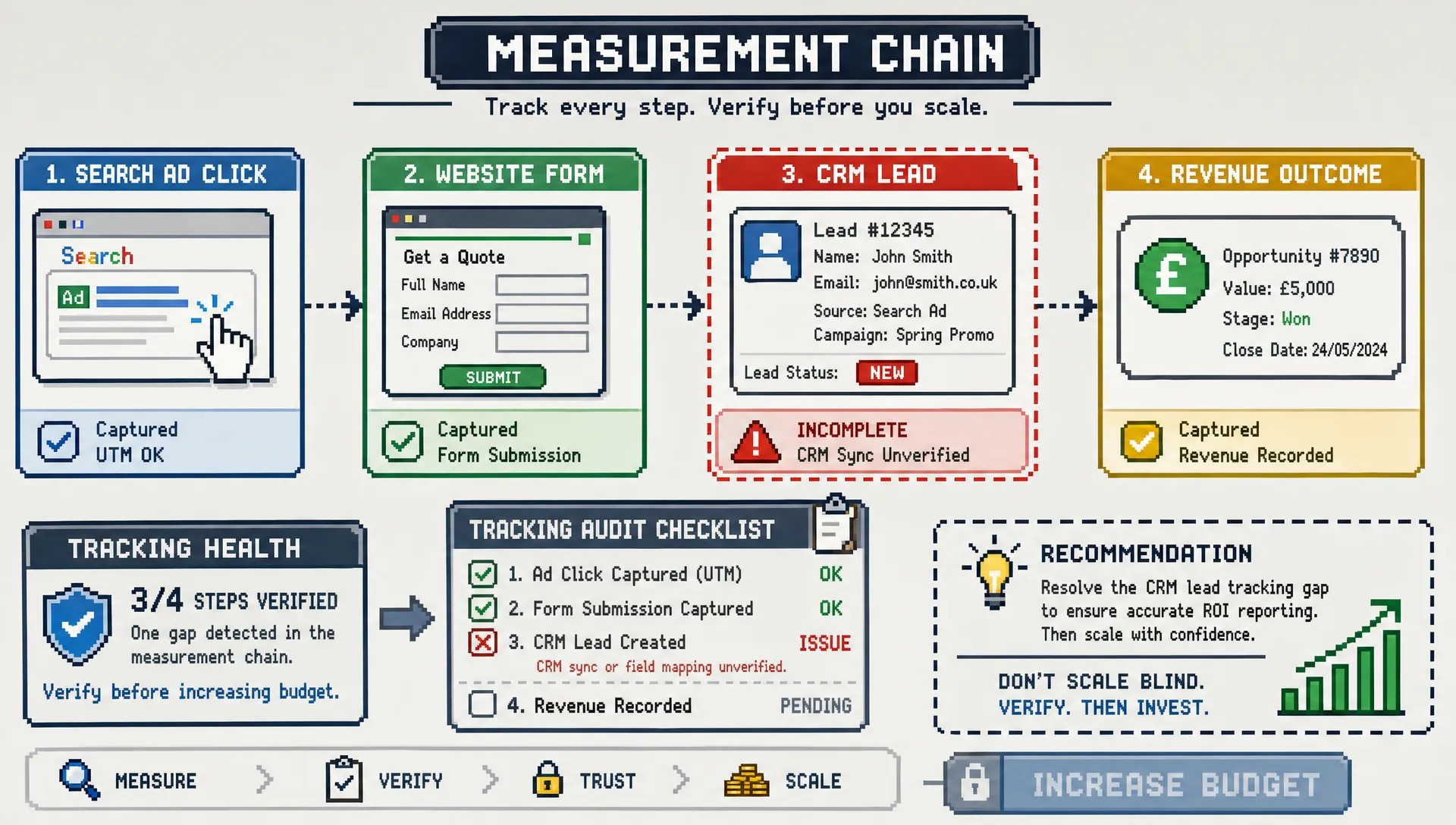
Scaling a Google Ads account feels like a positive moment. The client is asking what happens if they double the budget, lead volume is moving in the right direction, and the account finally looks ready to push harder.
But there is one question that should come before any spend increase: can you trust the tracking?
If conversion tracking is incomplete, duplicated, inflated, or disconnected from lead quality, scaling does not create clearer results. It simply amplifies the wrong signals. Smart Bidding learns from poor data, reports become harder to defend, and your agency may end up explaining why spend rose but revenue did not.
Tracking Google Ads properly is not just a technical setup task. It is the foundation for budget decisions, bidding strategy, forecasting, and client confidence. Before you scale spend, the account needs a tracking system that shows not only who converted, but which conversions are worth paying more to acquire.
Why tracking matters more when spend increases
At low spend, tracking issues can hide in the noise. A duplicate lead, a thank-you page firing twice, or a form submission counted as a sale may not seem urgent when the budget is modest.
Once spend rises, those issues become expensive.
Google Ads bidding systems rely on conversion data to decide where to show ads, who to prioritise, and how aggressively to bid. If the account is optimising towards weak or misleading conversion actions, more budget gives the algorithm more room to chase the wrong outcomes.
This is why unreliable tracking is one of the most damaging Google Ads management mistakes that hurt ROI. The account may appear to be improving inside the platform while the client sees poor lead quality, missed sales targets, or rising cost per acquisition in the real world.
Proper tracking answers three questions:
- Did the user take the intended action? The account must capture the real conversion event, not just any engagement.
- Was that action commercially valuable? Leads, calls and purchases should be qualified wherever possible.
- Can Google Ads use the signal correctly? Conversion actions, values, attribution and consent settings need to support optimisation.
If any of those answers are unclear, scaling should wait.
The warning signs of weak Google Ads tracking
Poor tracking is not always obvious. Sometimes the account looks healthy at first glance. Conversion volume is high, cost per conversion is stable, and campaigns have enough data for automated bidding.
The warning signs usually appear when you compare platform data with actual business outcomes.
| Tracking warning sign | What it often means | Why it matters before scaling |
|---|---|---|
| Conversions are much higher than CRM enquiries | Duplicate tags, repeated thank-you page visits, or micro-conversions counted as primary goals | Budget may be allocated to activity that does not generate revenue |
| Cost per conversion looks strong but lead quality is poor | The account is optimising for easy leads, not valuable leads | Scaling increases low-intent volume |
| Google Ads and GA4 show very different trends | Attribution, tagging, consent, or event setup differences are not understood | Reporting becomes hard to explain to clients |
| Calls are counted but not qualified | Every short or accidental call may be treated as a conversion | Campaigns may optimise towards low-value calls |
| Multiple conversion actions are set as primary | Smart Bidding may optimise towards mixed goals | The system cannot clearly prioritise the business objective |
| Revenue values are missing or static | The account cannot distinguish high-value and low-value conversions | ROAS-based decisions become unreliable |
Some variation between platforms is normal because Google Ads, GA4 and CRM systems do not attribute conversions in exactly the same way. The problem is not that numbers differ. The problem is when nobody can explain why they differ.
What “proper” tracking means in Google Ads
Proper tracking is not the same as “a conversion tag exists”. A tag firing somewhere on the site is only the starting point.
For Google Ads, a proper setup should define the conversion action clearly, fire at the right moment, avoid duplication, respect consent requirements, and feed useful data back into the account.
Google’s own documentation explains that conversion tracking helps advertisers understand what happens after an ad interaction, including purchases, sign-ups, calls and other valuable actions. For agencies, the commercial interpretation is just as important as the technical implementation.
Primary and secondary conversions
One of the most important checks is whether conversion actions are marked correctly.
Primary conversions are used for bidding and appear in the main “Conversions” column. Secondary conversions are observed for reporting, but are not used directly by Smart Bidding.
For a lead generation account, a qualified form submission may be primary. A newsletter sign-up, PDF download, page view, or low-intent enquiry may be secondary. For ecommerce, completed purchases should usually be primary, while add-to-cart or begin-checkout events may be secondary unless there is a deliberate strategy behind using them.
Before scaling, review every conversion action and ask: would we happily give Google more budget to find more of this?
If the answer is no, it probably should not be a primary conversion.
Conversion values
Value tracking is another common weak point. When every lead has the same value, Google Ads cannot learn which enquiries are most likely to become profitable customers.
That does not mean every account needs perfect revenue data on day one. But the more you want to scale, the more important value becomes.
For ecommerce, purchase values should be passed dynamically wherever possible. For lead generation, values can be estimated using close rates, average deal value, or imported offline outcomes from a CRM. Even a thoughtful value model is often better than treating every lead as equal.
Deduplication
Duplicate conversions are one of the quickest ways to make an account look better than it is.
Common causes include thank-you pages that can be refreshed, users returning to confirmation pages, the same event being imported from GA4 and also tracked directly in Google Ads, or both browser and server events firing without correct deduplication.
Before increasing spend, test the full conversion journey and compare what fires in Google Tag Manager, GA4, Google Ads and the CRM. If one enquiry creates two or three platform conversions, the account is not ready to scale.
GA4, Google Ads and the CRM should each have a role
A mature tracking setup does not rely on one platform to explain everything.
Google Ads is best for campaign optimisation and paid search performance. GA4 gives broader behavioural context across channels and sessions. The CRM or sales system tells you whether the lead became a real opportunity or customer.
The mistake is expecting these systems to match perfectly. They use different attribution models, lookback windows, processing rules and identity signals. Instead of forcing exact alignment, agencies should define the role of each system in reporting.
A practical structure is:
| System | Best used for | Pre-scale tracking check |
|---|---|---|
| Google Ads | Bidding, campaign optimisation, paid media decision-making | Are primary conversions clean, valuable and not duplicated? |
| GA4 | Cross-channel behaviour, landing page analysis, assisted journeys | Are key events firing correctly and source data preserved? |
| CRM or sales system | Lead quality, pipeline, revenue and customer outcomes | Can paid leads be matched back to campaigns or click IDs? |
This is especially important for agencies managing accounts under client pressure. If the client only sees Google Ads conversions, they may approve higher spend based on misleading data. If the agency only sees CRM outcomes without campaign context, optimisation becomes slow and reactive.
The strongest setup connects both perspectives.
The pre-scale Google Ads tracking audit
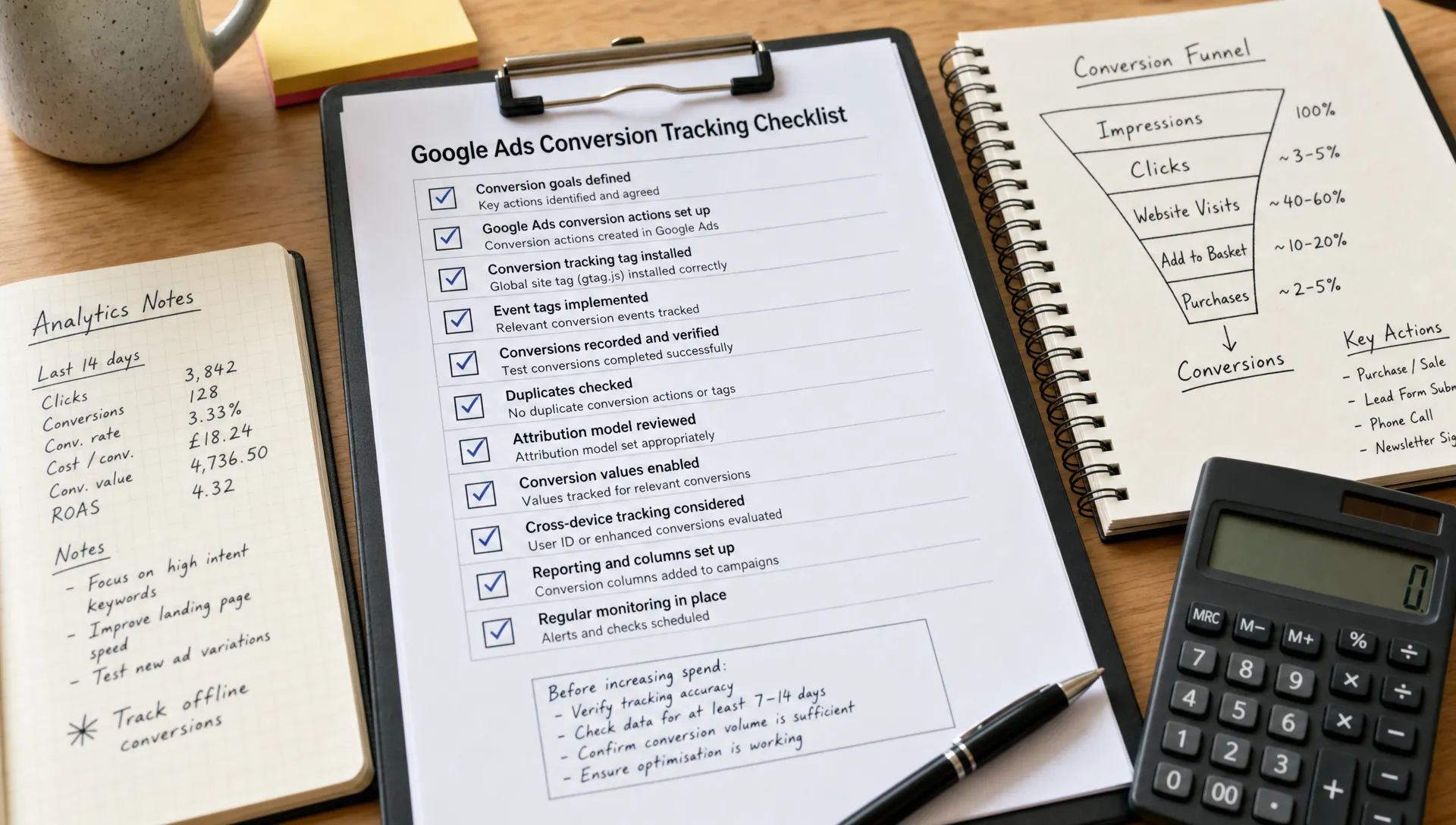
Before you raise budgets, change bid strategies, or expand campaigns, run a focused tracking audit. This does not need to become a months-long analytics project. It needs to prove that the account is optimising towards the right outcomes.
1. Check every conversion action
Open the conversion goals section in Google Ads and review each action. Look at the source, category, status, count setting, inclusion setting, attribution model, value and recent volume.
Pay close attention to old conversions that were created years ago, imported GA4 events that no longer reflect the client’s goals, and default account goals that may have been applied unintentionally.
The aim is to remove ambiguity. Each conversion action should have a clear purpose.
2. Test the user journey manually
Do not rely only on platform status messages. Complete the journey yourself.
Submit a test form, complete a test purchase if possible, trigger a call extension, click through landing pages, and check whether the correct tags fire once. Use Google Tag Assistant, GA4 DebugView and Google Ads diagnostics to verify the setup.
For lead generation, confirm that the test lead appears in the CRM with the right source, campaign, landing page and timestamp where possible.
3. Review count settings
Google Ads conversion actions can count “every” conversion or “one” conversion per ad interaction.
For purchases, “every” often makes sense because each transaction has value. For lead forms, “one” is usually more appropriate because multiple submissions from the same user rarely represent multiple independent opportunities.
Wrong count settings can inflate performance dramatically, especially after spend increases.
4. Separate hard conversions from soft signals
Soft signals can be useful, but they should not be mixed carelessly with final outcomes.
Examples of soft signals include scroll depth, time on site, video views, add-to-cart events, brochure downloads and pricing page views. These can help diagnose behaviour, build audiences, or support reporting. They should not be treated the same as purchases, booked consultations, qualified calls or submitted enquiries.
If an account lacks enough hard conversion volume, it may be tempting to optimise towards soft actions. That can be valid in some cases, but it should be a conscious decision with clear expectations, not a hidden tracking flaw.
5. Confirm consent and privacy settings
Consent has become a core part of tracking quality, particularly for UK and European advertisers. If consent banners, tag firing rules, Google Consent Mode or analytics settings are misconfigured, reported conversion data can be incomplete or inconsistent.
Google provides guidance on Consent Mode, which allows tags to adjust behaviour based on users’ consent choices. Agencies do not need to turn every PPC manager into a privacy lawyer, but they do need to make sure tracking works within the client’s consent framework and does not make false assumptions about data completeness.
6. Check enhanced conversions
Enhanced conversions can improve measurement by sending hashed first-party customer data to Google when users convert, where appropriate consent and implementation conditions are met. Google’s documentation explains how enhanced conversions can help improve conversion measurement accuracy.
For lead generation, enhanced conversions for leads can be particularly useful when paired with imported offline conversions, because it helps connect ad interactions to later lead outcomes.
Before scaling, check whether enhanced conversions are active, correctly configured and compliant with the client’s policies.
7. Match conversions to commercial outcomes
The most important tracking question is not “does the tag fire?” It is “does the conversion reflect something the business values?”
For ecommerce, compare Google Ads revenue with backend revenue and investigate major gaps. For lead generation, compare Google Ads leads with CRM lead records, qualified opportunities and closed deals.
If the account produces 200 leads but sales says only five were relevant, the tracking setup may be technically functional but strategically weak.
Lead generation tracking needs extra discipline
Lead generation accounts are especially vulnerable to misleading conversion data because a form submission is not the same as revenue.
A campaign can generate cheap enquiries from students, competitors, suppliers, spam bots, job seekers, or customers outside the service area. If every submission is counted equally, Google Ads may optimise towards the easiest forms to fill, not the best prospects to sell to.
Before scaling a lead generation account, agencies should try to connect at least some post-conversion quality data back to Google Ads. This can include qualified lead status, booked appointment, sales accepted lead, opportunity created, won deal, or estimated revenue.
Offline conversion imports are often the bridge. If the site captures the Google click ID, usually known as GCLID, that identifier can be stored in the CRM and later uploaded with lead outcomes. This allows Google Ads to optimise towards leads that progress, not just leads that submit.
Even if the client’s CRM setup is not perfect, start with a simple quality feedback loop. Ask the client to review recent paid leads and categorise them by fit. If most leads from a campaign are poor, scaling that campaign based on form fills alone is risky.
This is where senior PPC judgement matters. Clean tracking is not just setup work. It changes budget allocation, keyword priorities, bidding strategy and client communication.
Ecommerce tracking needs value accuracy
For ecommerce accounts, the biggest risks are usually missing revenue, duplicated purchases, incorrect currency, tax and shipping inconsistencies, or product-level data not matching the store backend.
Before scaling ecommerce spend, check whether Google Ads records transaction values close enough to the ecommerce platform to support optimisation. You should expect some difference due to attribution and timing, but not unexplained gaps that change the story of performance.
Also review whether refunds, cancellations and recurring purchases are handled in reporting. Google Ads may show the original transaction, while the business may later reverse it. This does not always need to be fed back into Google Ads immediately, but it should be considered when making scale decisions.
If the account uses target ROAS bidding, value accuracy becomes even more important. A campaign optimising towards inflated revenue will become more aggressive than it should. A campaign missing revenue may be unfairly limited.
Attribution should guide decisions, not excuse poor tracking
Attribution is often used as a catch-all explanation for mismatched data. Sometimes that is fair. Often it is not.
Yes, Google Ads, GA4 and a CRM can attribute the same customer journey differently. A user may click a Google ad, return through organic search, compare on another device, and convert days later. Each platform may assign credit in a different way.
But attribution differences should not hide basic tracking errors.
If conversions are duplicated, forms are not recorded in the CRM, or primary goals include low-value actions, attribution modelling will not fix the problem. It will only add complexity to a weak measurement foundation.
Before scaling, keep attribution conversations practical:
- Which platform is the source of truth for budget optimisation?
- Which system is the source of truth for revenue or lead quality?
- How much variance between systems is expected and explainable?
- Which decisions will be made from platform data, and which require CRM validation?
When these answers are documented, client conversations become calmer. The agency can explain why Google Ads reports one number, GA4 reports another, and the CRM reports a third without looking disorganised.
Do not scale until the account passes these checks
A Google Ads account does not need perfect tracking to grow. It does need tracking that is accurate enough to support the next level of spend.
Use this simple pre-scale decision framework:
| Question | Green light | Red flag |
|---|---|---|
| Are primary conversions commercially meaningful? | They represent purchases, qualified leads, booked calls or other valuable actions | They include soft events, old goals or unclear actions |
| Are conversions firing once per intended action? | Tests show one real action creates one expected conversion | Refreshes, duplicate tags or multiple imports inflate volume |
| Is value data reliable enough for bidding? | Revenue or estimated lead values are consistent and explainable | Values are missing, static, incorrect or inflated |
| Is lead quality visible? | CRM or sales feedback can be linked to campaigns | The agency only sees form submissions |
| Are reporting differences understood? | Google Ads, GA4 and CRM variance can be explained | Each platform tells a conflicting story |
| Is consent handled properly? | Tags respond correctly to the client’s consent setup | Tracking ignores or breaks under consent conditions |
If several red flags remain, focus first on fixing measurement. You will usually find faster performance gains by improving tracking quality than by increasing budget into a confused account.
For agencies, this also protects the client relationship. It is much easier to say “we need to validate measurement before scaling” than to explain later why the additional spend produced numbers nobody trusts.
How agencies should present tracking work to clients
Clients often see tracking as invisible work. They may understand campaign builds, ad copy, search terms and dashboards, but tracking can feel like technical housekeeping.
The agency’s job is to reframe it as risk control and growth preparation.
Instead of saying, “we need to check tags”, explain that the account should not spend more until the conversion data is reliable enough for bidding and reporting. This makes the work commercial, not just technical.
A strong client update might say:
“We have identified that the account is currently recording all form submissions as equal conversions. Before increasing budget, we are separating qualified enquiries from softer actions and checking CRM alignment. This will help Google Ads optimise towards leads that are more likely to become revenue.”
That kind of explanation builds trust. It shows the agency is not blocking growth, but protecting the client from waste.
If your team is already stretched, this is also where specialist support can help. PPC Ghost provides white-label Google Ads, Meta Ads, Microsoft Ads, GA4 and tracking support for agencies that need senior execution without hiring or long-term contracts. For a broader view of what should sit around measurement, this guide on what professional Google Ads management should include is a useful companion.
Scaling spend safely after tracking is fixed
Once tracking is clean, scaling should still be controlled. Better tracking gives you confidence, but it does not remove the need for disciplined budget management.
Increase spend in stages, monitor conversion quality, and watch for changes in search terms, impression share, CPA, ROAS and CRM outcomes. Scaling often changes the traffic mix. Campaigns may enter broader auctions, attract more marginal clicks, or expose landing page weaknesses.
This is where waste control and measurement work together. If you want to cut leakage before increasing investment, these PPC Google Ads tips that reduce wasted spend pair naturally with a tracking audit.
The key is to treat tracking as an ongoing performance lever, not a one-off setup. Every new landing page, offer, CRM change, consent banner update or campaign goal can affect measurement quality.
Frequently Asked Questions
What is the most important tracking check before scaling Google Ads spend? The most important check is whether primary conversions represent real commercial value. If Google Ads is optimising towards soft, duplicated or low-quality conversions, increasing budget will usually amplify waste.
Should I use GA4 conversions or Google Ads conversion tags? Both can be valid, but the choice should be deliberate. Google Ads tags are often preferred for bidding responsiveness, while GA4 imports can support consistency across wider reporting. Avoid tracking the same conversion twice unless deduplication is handled correctly.
Why do Google Ads and GA4 conversion numbers not match? They use different attribution models, reporting logic, lookback windows and identity signals. Some difference is normal. The issue is when the difference is large, unexplained, or caused by faulty setup.
Are enhanced conversions necessary before scaling? They are not always mandatory, but they can improve measurement quality when implemented correctly with appropriate consent. They are especially useful when first-party data can help recover conversion signals that would otherwise be harder to observe.
How often should Google Ads tracking be audited? Tracking should be checked before major spend increases, after website or CRM changes, when consent tools are updated, and whenever reported conversions stop matching business outcomes. For active accounts, a regular quarterly review is a sensible baseline.
Need white-label help with Google Ads tracking?
If your agency is preparing to scale spend but the tracking does not feel solid, do not guess. A senior specialist can audit the setup, identify the weak signals, and help you fix measurement before budget goes up.
PPC Ghost supports UK agencies with white-label PPC execution, including Google Ads, Meta Ads, Microsoft Ads, GA4 and tracking support. You keep the client relationship, your agency takes the credit, and the account gets the senior attention it needs before scaling.