Meta Ads Reporting Templates Agencies Can Reuse
Reusable Meta Ads reporting templates for agencies, with client-ready layouts, KPI sections, creative insights and next-step commentary.
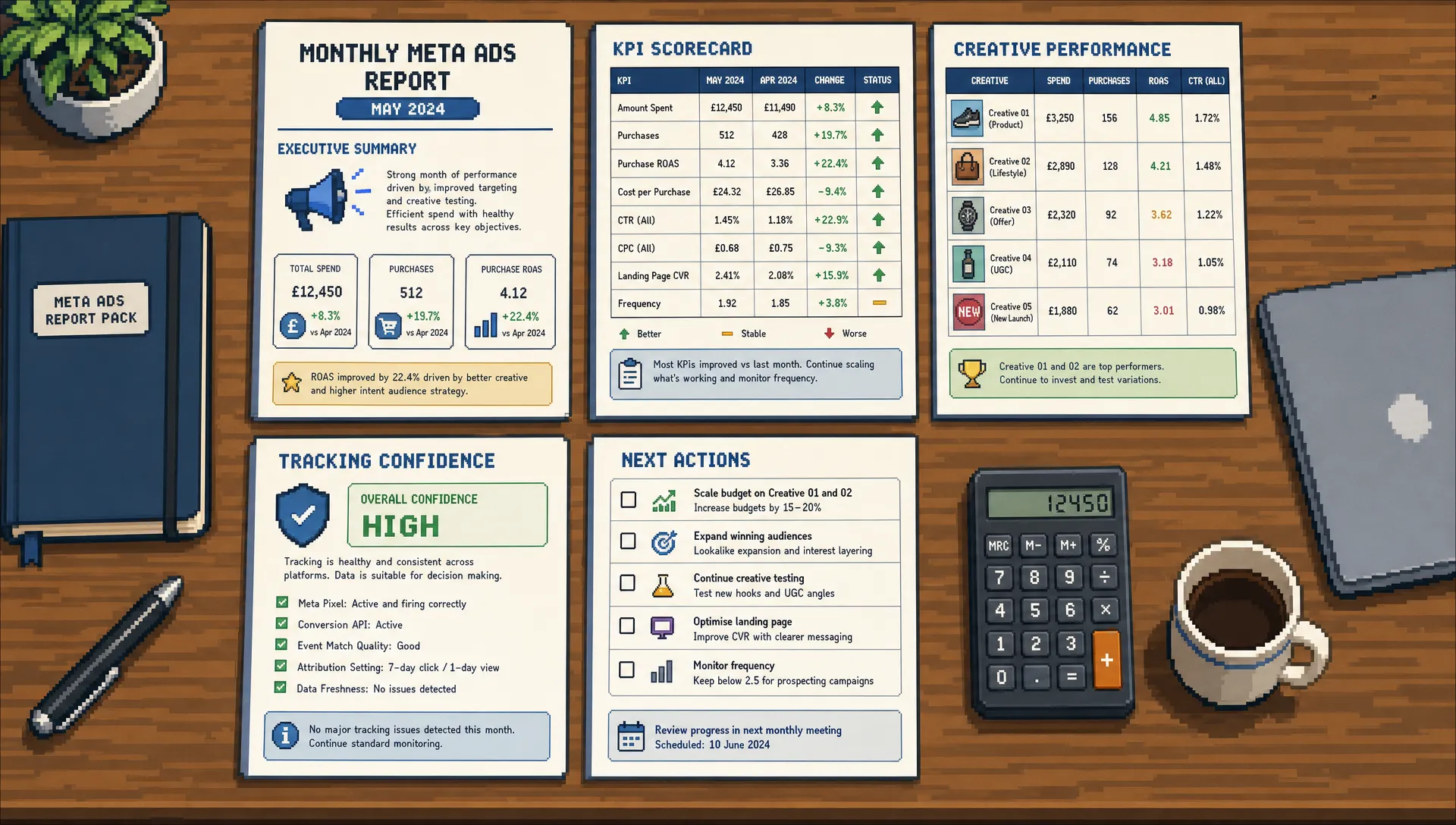
A strong Meta Ads report should do more than prove that activity happened. It should help a client understand what changed, what it means, and what the agency is doing next.
That is where many agency reports fall short. They often become screenshots from Ads Manager, a long list of metrics, or a dashboard link with no real interpretation. The client sees spend, impressions, clicks and conversions, but they still ask the same question: is this working?
Reusable Meta Ads reporting templates solve two problems at once. They save your team time, and they create a consistent standard for client communication. Whether you manage ecommerce, lead generation, local service or B2B accounts, the structure should be simple enough to repeat and flexible enough to adapt.
Below are practical templates your agency can reuse for monthly reports, weekly internal updates, creative analysis, tracking checks and client commentary.
What every agency Meta Ads report should answer
Before building the template, define the job of the report. A Meta Ads report is not a data dump. It is a decision document.
Every useful client report should answer four questions:
- What happened during the reporting period?
- Why did performance move in that direction?
- What does it mean for the business goal?
- What are we doing next?
If the report cannot answer those questions, the client is likely to focus on isolated metrics such as CPM, CTR or cost per click. Those numbers can be useful, but they rarely tell the full story on their own.
For example, a higher CPM is not automatically bad if lead quality improved. A lower cost per lead is not automatically good if the sales team says enquiries are poor. A strong report connects Meta performance to commercial context.
If your agency currently reports in-platform numbers without enough business interpretation, it is worth reviewing the broader Facebook Meta Ads mistakes agencies still make, especially around weak tracking, over-editing and reporting without business context.
A reusable reporting structure should include these core sections:
| Report section | Purpose | Typical metrics or notes |
|---|---|---|
| Executive summary | Gives the client the headline outcome quickly | Goal, result, main driver, next action |
| KPI scorecard | Shows whether performance is on track | Spend, conversions, CPA, ROAS, revenue, lead volume |
| Trend analysis | Explains movement over time | Week on week or month on month changes |
| Campaign breakdown | Shows what worked by campaign or objective | Budget, results, CPA, conversion rate, ROAS |
| Creative insights | Identifies winning and declining ads | Hook, format, offer, CTR, thumb-stop signals, CPA |
| Audience and placement notes | Adds context without overcomplicating the report | Broad targeting, remarketing, Advantage+ placements, exclusions |
| Tracking and attribution notes | Manages data confidence and caveats | Pixel, Conversions API, GA4, CRM, UTMs |
| Next actions | Turns reporting into a plan | Tests, budget changes, creative requests, landing page actions |
Template 1: Monthly client Meta Ads report
The monthly report is the client-facing version. It should be polished, concise and commercially focused. A good target is 8 to 12 slides or sections, depending on account complexity.
Use this template for retainers, monthly review calls and performance summaries.
| Section | What to include | Commentary prompt |
|---|---|---|
| 1. Executive summary | One short paragraph on overall performance | The account is on track, behind target or ahead of target because... |
| 2. KPI scorecard | Primary KPIs versus previous period and target | The biggest movement was... |
| 3. Spend and delivery | Budget used, pacing, frequency and reach | Spend was increased, reduced or held because... |
| 4. Conversion performance | Leads, purchases, revenue, CPA, ROAS or pipeline indicators | Conversion efficiency changed due to... |
| 5. Campaign performance | Breakdown by campaign or funnel stage | The strongest campaign was... while the weakest area was... |
| 6. Creative performance | Best and worst ads, patterns, fatigue signs | The winning creative theme was... |
| 7. Audience and placement notes | Any meaningful shifts in delivery | Meta allocated more spend towards... |
| 8. Tracking caveats | Known limitations or discrepancies | Data should be read with this context... |
| 9. Work completed | Optimisations made during the month | We adjusted... to improve... |
| 10. Next month plan | Tests, creative requests and budget recommendations | The next priority is... |
Keep the executive summary short. Senior stakeholders may only read this section before a call, so it needs to carry the main message.
A copy-ready format looks like this:
Reporting period:
Primary objective:
Overall result:
Main performance driver:
Main risk or constraint:
Action taken this period:
Recommended next step:
Client decision needed:
Here is an example of the level of commentary to aim for:
The account generated more leads than last month at a lower cost per lead, mainly due to stronger performance from the testimonial creative and improved conversion rate on the landing page. The main constraint is creative fatigue in remarketing, where frequency has increased and click-through rate has softened. Next month, we recommend refreshing remarketing assets and shifting more budget into the strongest broad prospecting ad set.
Notice that this summary does not list every metric. It explains the story behind the numbers.
Template 2: Weekly internal optimisation report
The weekly report is usually not for the client, although parts of it can feed the monthly review. Its purpose is to keep the account manager, strategist and delivery specialist aligned.
This should be fast to complete and focused on decisions. If it takes longer than 15 to 20 minutes for a normal account, it is probably too detailed.
| Weekly check | What to record | Why it matters |
|---|---|---|
| Spend pacing | Spend to date versus planned budget | Prevents underdelivery or overspend |
| KPI direction | CPA, ROAS, lead volume or purchase volume trend | Flags whether performance needs action |
| Delivery issues | Learning limitations, rejected ads, low delivery | Helps the team fix blockers quickly |
| Creative changes | New ads launched, paused ads, fatigue notes | Keeps creative testing visible |
| Tracking anomalies | Sudden drops, duplicated events, missing UTMs | Avoids reporting false conclusions |
| Optimisations made | Budget shifts, exclusions, bid or campaign changes | Creates an audit trail |
| Next 7 days | Clear actions and owners | Turns analysis into execution |
A weekly update does not need full design. A shared document, project management note or internal dashboard is enough. The key is consistency.
The most useful weekly reports are specific. Instead of saying performance is down, write what changed. For example: prospecting CPA rose by 18% after two higher-spend days from the new video ads, while remarketing remained stable. That sentence gives the team somewhere to look.
Template 3: Creative performance report
Creative is often the biggest lever in Meta Ads performance, especially when campaigns rely on broad targeting or algorithmic delivery. A campaign-level report can hide what is really happening because one winning ad may be carrying the account.
A separate creative performance template helps your agency spot repeatable patterns. It is also useful for client conversations because it turns vague feedback into evidence.
| Creative element | What to capture | Example note |
|---|---|---|
| Format | Static, video, carousel, UGC-style, testimonial | Short-form video is driving cheaper leads |
| Hook | First line, opening visual or main claim | Problem-led hooks are outperforming feature-led hooks |
| Offer | Discount, consultation, trial, download, product bundle | The free audit offer has stronger conversion intent |
| Audience signal | Prospecting, remarketing, lookalike or broad | Broad delivery is favouring social proof ads |
| Spend | Amount spent per ad | Winning ads have enough spend to be meaningful |
| CTR and CPC | Engagement indicators | High CTR is not translating into leads on one concept |
| Conversion metric | CPA, purchases, leads or booked calls | Testimonial ads show the best CPA |
| Fatigue signal | Frequency, declining CTR, rising CPA | Remarketing creative needs refresh |
| Next action | Scale, iterate, pause or brief new variant | Create two more variants using the same hook |
The creative report should not simply crown one ad as the winner. It should identify the reason an ad won. Was it the angle, the format, the proof point, the offer or the landing page match?
That insight gives your agency better briefs for the next round of creative. It also helps clients understand why you are asking for new assets rather than appearing to request them at random.

Template 4: Adapt the report by account type
Not every Meta Ads report should use the same primary KPIs. The structure can remain consistent, but the emphasis should change based on the client model.
An ecommerce client usually cares about revenue, ROAS, average order value and new customer growth. A lead generation client may care about cost per qualified lead, booked calls and sales pipeline. A local service client may care about form fills, calls and location coverage.
Use this adaptation table to keep reporting relevant.
| Account type | Primary report focus | Metrics to prioritise | Extra context to include |
|---|---|---|---|
| Ecommerce | Revenue and profitable scaling | Purchases, revenue, ROAS, CPA, average order value | Product margins, new versus returning customers, promo periods |
| Lead generation | Lead volume and quality | Leads, cost per lead, qualified lead rate, booked calls | CRM feedback, sales acceptance, form quality |
| B2B | Pipeline contribution | Cost per lead, cost per qualified lead, opportunities | Longer sales cycle, offline conversion tracking, lead source quality |
| Local services | Enquiry efficiency | Calls, forms, messages, cost per enquiry | Service area, opening hours, call handling |
| App or SaaS | Acquisition and activation | Registrations, trials, subscriptions, cost per trial | Trial quality, retention signals, onboarding data |
This is where many agency reports become too generic. If every client receives the same report with the same KPI hierarchy, the report may look efficient internally but feel irrelevant externally.
For lead generation accounts, add a short lead quality section. Even a simple split between qualified, unqualified and pending review can change the conversation. Instead of defending cost per lead in isolation, you can discuss which campaign is producing leads the sales team can actually use.
For ecommerce accounts, avoid treating ROAS as the only truth. Meta-reported ROAS is useful, but it should be read alongside platform attribution settings, website revenue, returns, margin and new customer value where the client can provide that data.
Commentary snippets agencies can reuse
The fastest way to improve Meta Ads reporting is to upgrade the commentary. Clients do not need more adjectives. They need precise interpretation.
Use this table to turn weak reporting language into stronger client-ready commentary.
| Situation | Weak commentary | Better commentary |
|---|---|---|
| CPA increased | Costs went up this month | CPA increased because conversion rate dropped after spend shifted into colder prospecting audiences. We are testing new proof-led creative to improve lead intent. |
| CTR improved | Engagement was better | CTR improved on the new video ads, but conversion rate has not yet followed. The next test is to align the landing page headline with the ad hook. |
| ROAS dropped | ROAS was lower | ROAS declined during the promo gap after last month’s sale period. Purchase volume remained stable, but average order value reduced. |
| Spend increased | We scaled the campaign | Spend was increased by 20% after the account held CPA below target for 10 days. We are monitoring frequency and conversion rate before increasing again. |
| Creative fatigue | Ads are getting tired | Frequency has risen and CTR has declined across remarketing, which suggests the current creative set is fatiguing. New remarketing assets are now the priority. |
| Tracking issue | Tracking looks wrong | Meta and GA4 are showing a wider gap than usual. We are checking UTMs, event firing and recent website changes before making budget decisions. |
This style of commentary does three things. It names the metric, explains the likely cause and states the action. That is the difference between reporting and account leadership.
Add a tracking and attribution block to every report
Meta Ads reporting is only as useful as the data behind it. Agencies should not hide tracking limitations, but they should explain them clearly and calmly.
Clients often compare Meta Ads Manager, GA4, Shopify, HubSpot or their CRM and expect the numbers to match exactly. They usually will not. Different platforms use different attribution rules, conversion definitions and data processing methods.
A short tracking block prevents confusion and protects your recommendations from being judged against the wrong data source.
| Data confidence item | Status to record | Client-friendly explanation |
|---|---|---|
| Meta Pixel events | Working, needs review or issue found | Confirms whether key website actions are being sent to Meta |
| Conversions API | Active, not active or needs review | Helps improve server-side event signal where available |
| UTMs | Complete, partial or missing | Supports GA4 and CRM source reporting |
| GA4 comparison | Aligned, acceptable variance or major variance | Explains differences between Meta and analytics data |
| CRM or sales feedback | Available, partial or not available | Shows whether lead quality can be assessed beyond form submission |
| Website changes | None, planned or recent | Flags changes that may affect conversion rate |
This section does not need to be long. In many reports, three lines are enough:
Tracking status: No major issues identified.
Attribution note: Meta and GA4 use different attribution logic, so exact conversion totals will vary.
Data confidence: Sufficient for optimisation decisions this period.
If there is a known issue, be direct. For example: the Meta lead event stopped firing for part of the month after a form plugin update. Reported conversions are likely understated from 12 to 15 July, so we have used CRM lead totals as the reference point for that period.
That level of transparency builds trust.
Dashboard versus written report
Agencies often ask whether they need a written report if they already have a live dashboard. The answer is usually yes.
A dashboard is useful for access to numbers. A written report is useful for interpretation. The dashboard shows what happened, while the report explains what matters.
For most agencies, the best setup is a lightweight dashboard plus a monthly narrative summary. The dashboard can hold the always-on metrics, while the report focuses on changes, learnings and decisions.
A reusable dashboard might include spend, results, CPA, ROAS, conversion value and campaign breakdowns. The written report should then add the context: why results changed, what has been done, what the risks are and what the client needs to approve.
This distinction is especially important for white-label or outsourced delivery. The client-facing agency needs a clear story, not just access to performance data. If you are considering outside support, this guide on how to choose a Meta Ads agency for client accounts covers what to look for around strategy, tracking, reporting and white-label collaboration.
How to turn these templates into a repeatable agency process
Templates only save time when the process around them is clear. If every account manager edits the structure, rewrites the commentary and pulls different metrics, reporting will still feel slow.
Start with one master template for each report type: monthly client report, weekly internal pulse, creative performance review and tracking check. Then create account-specific versions only when the business model genuinely requires it.
A practical reporting workflow looks like this:
- Lock the reporting date and comparison period before pulling data.
- Export or sync the same core metrics every time.
- Review tracking and attribution before writing conclusions.
- Write the executive summary last, after the analysis is complete.
- Add next actions with owners and deadlines where possible.
- Save final reports in a shared location with a consistent naming format.
The executive summary should always come last in the writing process, even though it appears first in the report. You cannot summarise the story properly until you have reviewed the numbers, creative, tracking and client context.
It is also worth creating a small glossary for clients. Define terms such as CPA, ROAS, CTR, CPM, frequency and attribution window in plain English. This reduces repeated questions and helps new stakeholders understand the report faster.
Quality checklist before sending a Meta Ads report
Before a report reaches the client, run a final review. This is where agencies catch the small issues that damage confidence.
Use this checklist before sending:
- The reporting period is clearly stated.
- Spend matches the chosen date range.
- Main KPIs are compared against the correct previous period or target.
- Lead, purchase or revenue definitions are consistent with prior reports.
- Screenshots and tables use the same currency and naming conventions.
- Commentary explains causes, not just metric movement.
- Tracking caveats are included where relevant.
- Next actions are specific enough for the client to understand.
- Any client requests from the previous report are addressed.
- The report does not include unnecessary internal notes.
The final point matters. Internal optimisation notes can be useful, but they do not always belong in the client version. A client report should be transparent without exposing every tactical debate behind the scenes.
Frequently Asked Questions
What should a Meta Ads reporting template include? A reusable Meta Ads reporting template should include an executive summary, KPI scorecard, campaign breakdown, creative insights, tracking notes, work completed and next actions. The best templates combine performance data with clear interpretation.
How often should agencies send Meta Ads reports? Most agencies should send a monthly client report and maintain a weekly internal performance pulse. High-spend or fast-moving accounts may need more frequent client updates, but the monthly report is usually the main strategic review.
Should Meta Ads reports use GA4 data or Meta Ads Manager data? Both can be useful, but they should not be treated as identical. Meta Ads Manager is important for campaign optimisation, while GA4 and CRM data help validate wider website and business performance. The report should explain any major differences.
What is the most important metric in Meta Ads reporting? The most important metric depends on the client goal. Ecommerce accounts often focus on revenue and ROAS, while lead generation accounts should focus on lead volume, cost per lead and lead quality. A good report prioritises business outcomes over vanity metrics.
How can agencies make Meta Ads reports faster to produce? Agencies can speed up reporting by using fixed templates, consistent KPI definitions, saved dashboard views, standard commentary prompts and a weekly internal update process. The less you rebuild each month, the more time you can spend on analysis.
Need senior Meta Ads reporting support behind the scenes?
If your agency needs help managing Meta Ads delivery, reporting or tracking without hiring in-house, PPC Ghost provides white-label PPC support for UK agencies.
You get senior-only expertise on demand, with flexible pay-as-you-go support across Meta Ads, Google Ads, Microsoft Ads, GA4 and tracking. Your agency keeps the client relationship, while PPC Ghost helps with the execution behind the scenes.